2
at least two perspectives: employee self-assessment and manager feedback
360°
0
surprises: everyone decides when to share their input before the meeting
360°
reviews scheduled automatically according to your chosen plan and frequency
Appraisals in action
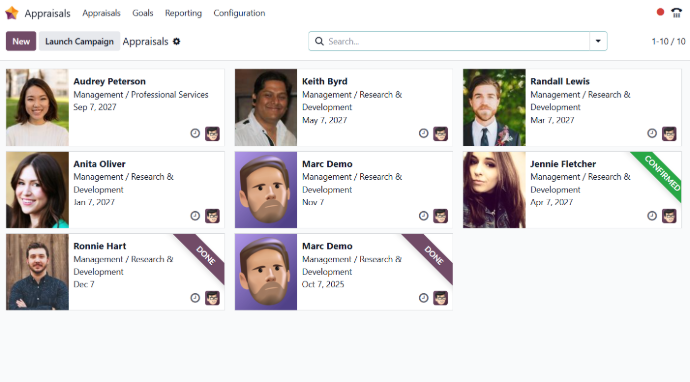
DASHBOARD
All appraisals at a glance
See who has an appraisal, its status, and what's coming due — the whole team review cycle in one place.
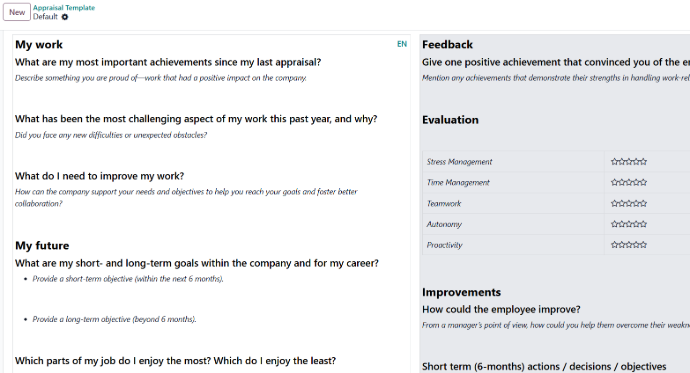
SELF-APPRAISAL
Employees have their say first
Employees fill in their templates and update skills — responses remain hidden until they choose to share with their manager.
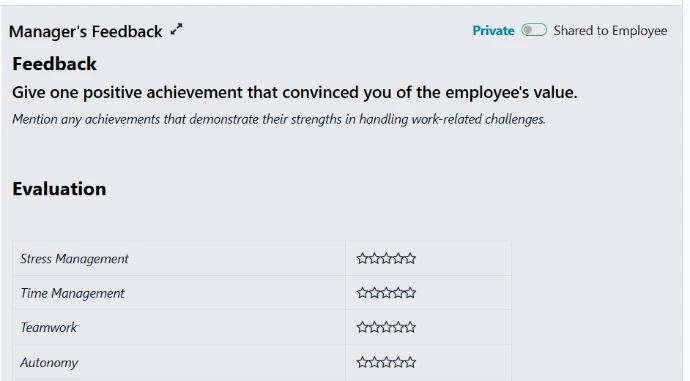
MANAGER FEEDBACK
Prepared thoughtfully, shared on time
Managers review goals, gather context, and write feedback — private until they choose to share it with employees.
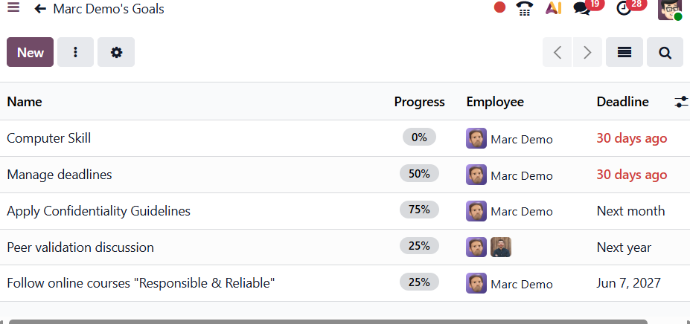
GOALS
Goals with deadlines and progress
Every employee has goals, target dates, and progress — linked to appraisals to review each cycle
Connected development, not isolated
Odoo Appraisals isn't an annual form nobody wants to fill out. It's a process with two perspectives — employee and manager — and controlled visibility so the real conversation happens in the meeting, not in the form. Results enrich employee profiles with skills, goals, and ratings.
Appraisals scheduled automatically based on your plan
Employee self-appraisal with its own template
Manager feedback, private until shared
Review meetings scheduled directly from appraisals
Goals with progress and updated skills in the profile
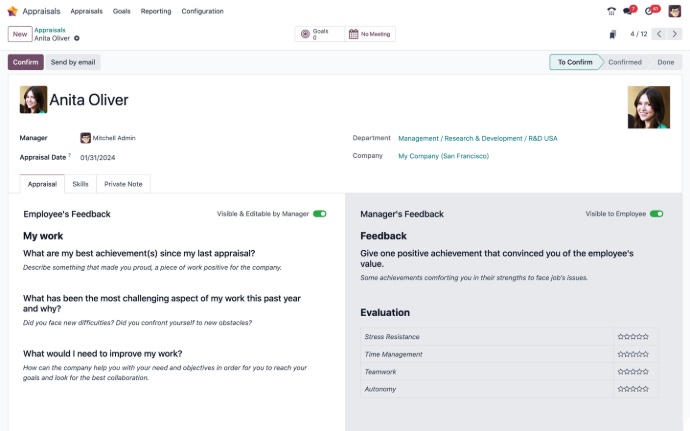
Everything you need for your appraisal cycle, already included...
Automatic scheduling
Appraisal plans at your chosen frequency — reviews generate themselves without chasing dates.
Employee self-appraisal
Employees complete templates and update skills. Their responses remain hidden until they share them with their manager.
Manager feedback
Achievements, areas for improvement and actionable next steps — with the option to keep them private until the meeting, plus a private note that is never shared.
Review meeting
Schedule directly from appraisals: managers and employees discuss both sections, confirm skills, and agree on next steps.
360-degree feedback
Request feedback from colleagues and direct reports through a separate survey with a deadline — then review the combined results.
Custom ratings and scales
Editable rating scales — from "needs improvement" to "far exceeds expectations," or your own levels — with customizable appraisal templates.
Skills grow
and the profile records it
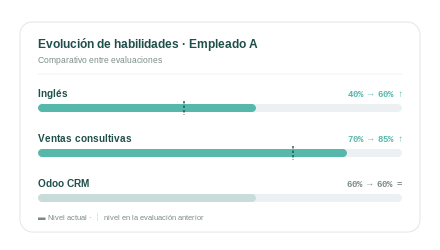
During appraisals, new skills are added and existing ones updated — employees demonstrate their growth and everything stays on their profile. The skills appraisal report shows changes over time: improved, declined, or unchanged.
Skills added and updated during appraisals
Everything is recorded in the employee profile
Progress report: improved, declined or unchanged
More eyes on it than just the boss's,
with a deadline
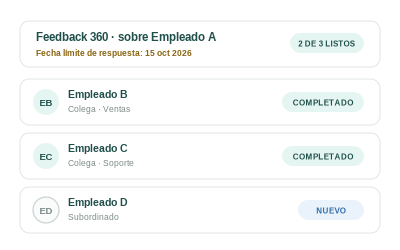
From a confirmed appraisal, managers request feedback from people who work with the employee — colleagues, direct reports, whoever is relevant — using a separate survey and deadline. Combined results provide a broader view than just one person's perspective.
Send a request to several colleagues at once, with a deadline
Clear statuses: answered or pending
Combined results from all respondents
Goals with deadlines and progress,
checked every cycle
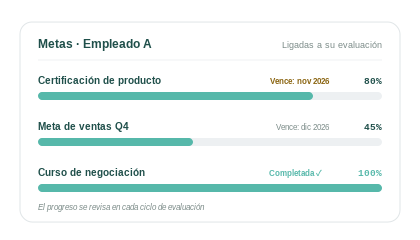
Every employee has goals with target dates and progress updated over time. Smart buttons link goals to appraisals, so progress is reviewed every cycle — and development conversations rely on agreed objectives, not memory.
Goals for each employee with target dates
Progress tracked over time
Linked to appraisals for review in every cycle
WHO IT'S FOR
If your appraisals live in Word documents filled in the night before, this is for you.
Companies that never have enough time
Annual appraisals that always get postponed — automatic scheduling starts each cycle without chasing dates.
Managers with large teams
Ready-made templates, 360 feedback to avoid relying on a single impression, and individual goals close at hand during meetings.
HR teams seeking data-driven employee development
Measured skills development between review cycles, comparable ratings, and analysis by status — not scattered impressions.
Teams that want to grow
Employees have their say first through self-assessments, see progress toward goals, and have their development recorded on their profile.
FREQUENTLY ASKED QUESTIONS
What we get asked most before getting started
01 How are appraisals scheduled?
With appraisal plans and automatic scheduling: set the frequency and reviews are generated for each employee. Schedule manual appraisals whenever needed.
02 What does the appraisal process involve?
Four steps: employees complete self-assessments and update skills; managers review goals and write feedback; they meet to discuss both sections and agree on next steps; and the final rating is recorded. Both form templates are editable.
Only when you decide. Your section stays private until you choose to share with employees — many managers wait until the meeting. Employees' self-assessments also remain hidden until shared. Managers can keep separate private notes that are never shared.
04 What is 360-degree feedback and what do I need to use it?
It lets you request feedback about employees from anyone in the company — colleagues, direct reports — through a separate survey with a deadline and combined results. Requires Surveys, since the 360 form is an editable, preconfigured survey.
05 How do goals work?
Every goal has an employee, target date, and progress updated over time. Smart buttons link goals to appraisals, helping teams review progress each cycle and base development conversations on agreed objectives.
06 Can I use my own rating scale?
Yes. The rating scale comes preconfigured — Needs Improvement, Meets Expectations, Exceeds Expectations, and Greatly Exceeds Expectations — but you can add, rename, and reorder levels to fit your company's evaluation system.
Appraisals connected to your entire operation

Employees
Skills updated in each appraisal live in employee profiles — alongside CVs, certifications, and records.

Recruitment
From hired applicant to appraised employee: the complete talent lifecycle, from vacancy to development.

Learning
Appraisal findings addressed through courses — with employee progress visible from their profile.

Surveys
The engine behind 360 feedback: editable surveys for colleagues and direct reports.
Tell us how you currently evaluate your team
A Wayakna consultant will review your situation — how often you conduct appraisals, which formats you use and what you do with the results — and recommend the right implementation without unnecessary complexity.