CFDI4.0
Up to date and compliant with SAT requirements
<30s
platform for CRM, Sales, Marketing and Accounting
∞
average stamping with our integrated PAC
1
connected accounting, no douplicate data entry
Invoicing in action
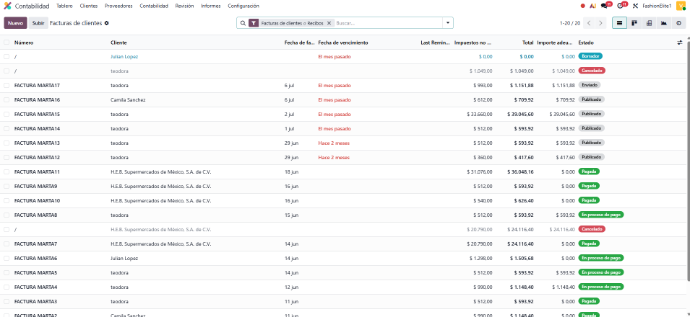
INVOICE LIST
All your invoices in one view
Filter by status, customer, date, or CFDI validation status. Find invoices quickly and take action on several at once, such as canceling them or sending them by email.
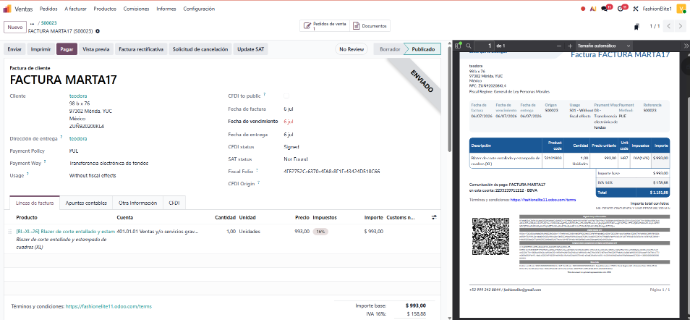
CFDI DETAILS
Validated CFDI 4.0 invoices
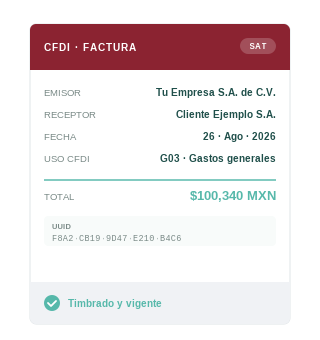
Tax details, CFDI usage, payment method, payment type, UUID, and SAT digital seal—all in the same form, with PDF and XML files ready to download.
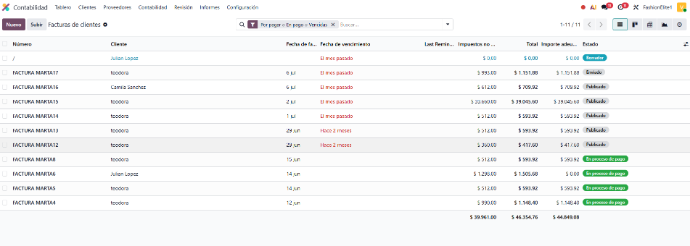
PAYMENT FOLLOW-UP
Track unpaid invoices and payment reminders
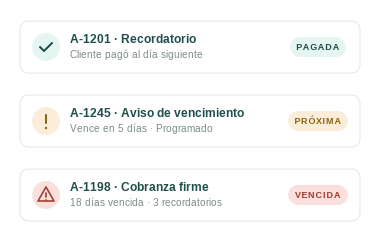
View each customer’s payment follow-up history. See which invoices are overdue, how many reminders have been sent, which have been opened, and which still need a response.
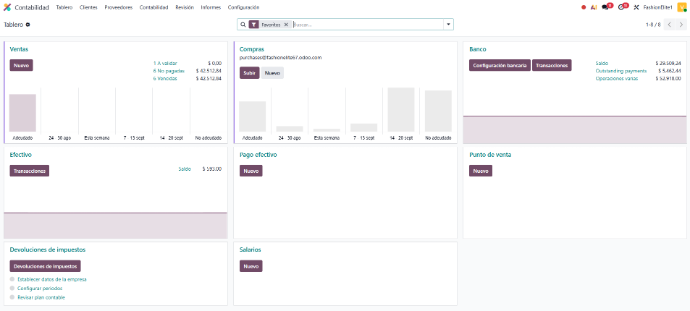
BANK RECONCILIATION
Match bank transactions to invoices
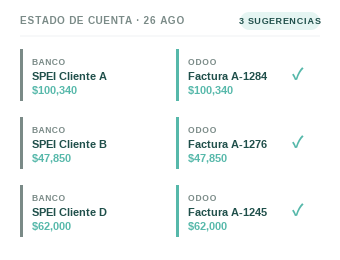
Import your bank statement, and Odoo suggests which payment matches each invoice. Approve the match with one click to mark the invoice as paid.
Invoicing connected to your business
Odoo Invoicing is more than an electronic invoicing tool. Create invoices from sales, validate them through a SAT-authorized provider, send them to customers, and follow up with automatic payment reminders. Then match payments to bank transactions—all without leaving Odoo or entering the same information twice.
CFDI 4.0 electronic invoicing with an integrated PAC.
Automatic invoicing from sales, projects, and deliveries.
PPD payment receipts generated automatically when payments are received.
Email payment reminders scheduled for each customer.
Online payments through Stripe, PayPal, SPEI bank transfers, and cards.
Automatic bank reconciliation with smart matching rules.
Everything you need to manage invoicing
Automatic invoicing
Invoice directly from sales, projects, timesheets, or deliveries. No need to enter customer details, products, or prices twice.
PAC-validated CFDI 4.0 invoices
Stamped in seconds, valid XML, supplements (PPD payment, transport letter, foreign trade) and cancellation in accordance with SAT regulations.
Online payments
Customers pay using the link on their invoice via Stripe, PayPal, SPEI, or bank terminal. The payment is recorded automatically, the invoice is marked as paid.
Automatic reminders
Payment notices and reminders for customers with overdue invoices, with calendars and tones configurable by aging and customer type.
Bank reconciliation
Upload the statement or connect it via API. Odoo suggests which deposit corresponds to which invoice, you approve with one click.
Real-time reports
Accounts receivable, aging of balances, collection KPIs, and expected cash flow — up to date, without waiting for month-end.
INVOICING + SAT-AUTHORIZED PAC
CFDI validation
in seconds, not minutes
The PAC integrated into Odoo stamps each CFDI 4.0 instantly — with SAT validation, UUID, and seal. Without leaving the system, without uploading files to another portal, without waiting for responses from the PAC in another window.
Real-time validation directly from the invoice form
Supplements: payment (PPD), waybill, foreign trade
Cancellations using the SAT’s current cancellation reasons
INVOICING + PAYMENT FOLLOW-UP
Payment reminders that
follow up for you
Each customer receives automatic emails according to their payment terms and your collection policy. Friendly at the beginning, firm at the end — and always with the invoice and payment link within the same email.
Reminders scheduled by the number of days overdue
Templates based on customer type or how long payments are overdue
Online payment link included in each email
INVOICING + BANKING
Bank reconciliation with
automatic matching suggestions
Upload the bank statement or connect it via API. Odoo identifies which bank transaction corresponds to which invoice and suggests the match. You approve — or correct — with one click.
Bank statement from file or direct bank connection
Suggestions by amount, date, and reference
Payment complement (PPD) generated automatically
WHO IS IT FOR?
If your team still creates invoices manually, tracks payments in spreadsheets, or wastes time reconciling information, this is for you.
Distributors and wholesalers
With many recurring B2B clients, credit terms, payment complements, and weekly payment follow-ups.
Professional services
Firms, agencies, and consultants that bill by project, hour, or retainer — with PPD and payment receipts for each advance payment received.
Retailers and businesses with multiple locations
Invoicing at the point of sale or monthly consolidated invoice — without capturing the ticket twice, with the client's RFC already in the record.
B2B manufacturers
Sales orders that turn into invoices upon delivery, with specific withholdings and tax data per corporate client.
FREQUENTLY ASKED QUESTIONS
Common questions before getting started
01 Does Odoo stamp CFDI 4.0 directly or do I need an external PAC?
Odoo connects with a PAC (SW Sapiens, Facturama, or others) to stamp CFDI 4.0. Wayakna sets up the connection and flow — you don't see the PAC, you just issue the invoice from Odoo and the stamping happens in seconds.
02 Does it generate payment complements (PPD) automatically?
Yes. When you record a payment for a PPD invoice, the supplement is issued and stamped automatically — without entering it manually. Also, waybill and foreign trade for those who need them.
03 Can I send invoices by email with the PDF and the XML?
Yes. Each email includes the PDF, the XML, and the link to pay online. You can customize the email template by customer or by type of operation.
04 Are the collection reminders configurable?
Yes. You define how many days before or after the due date they are sent, with what tone, to which customer contact, and how many reminders are sent before someone follows up personally.
05 Is bank reconciliation really automatic?
Yes. You import the bank file (or connect it via API) and Odoo suggests matches between transactions and invoices, by amount, date, and reference. You just approve or correct the exceptions.
06 Does it connect with Accounting or do you have to export and re-enter?
Invoicing and Accounting are the same system in Odoo. Each invoice generates its automatic accounting entry — without exporting, without re-entering, without waiting until month-end to keep your books up to dat to have the books up to date.
Invoicing connected with your entire operation

Sales
A won opportunity becomes a quotation, sales order, and invoice in one click, without re-entering products, prices, or terms.

E-commerce
Each purchase from your store generates an automatic invoice if the customer requests it — with the CFDI sent directly to their email right away.

CRM
Run CRM campaigns to segmented audiences with response metrics. Warm leads enter the pipeline already nurtured.

Accounting
The commercial cycle is closed with the invoice issued from Odoo. With all customer data already captured.
Tell us how you handle invoicing today
A Wayakna advisor will review your invoicing process—how many invoices you issue each month, how you follow up on payments, and how you reconcile bank transactions—and recommend a solution that fits your business without adding unnecessary steps.