1
an engineering change order (ECO) for improvements, with an owner and effective date
0
unapproved production changes: the current BoM stays untouched until changes are applied
Diff
visible differences between versions: what's added and what's removed
∞
versions: every previous bill of materials is archived
PLM in action
OVERVIEW
Your changes, organized
Every ECO type is its own project — new products, BoM updates, improvements — and each team sees only the changes relevant to them.
PIPELINE
Stage-based ECOs in Kanban
New, In Progress, Validated, Effective — default stages, customizable for each change type's actual lifecycle.
DIFFERENCES
See changes highlighted in color
The Changes tab compares production and revised BoMs: blue for additions, black for shared parts, red for removals.
APPROVALS
Nothing is applied without approval
Role-based approvers in the verification stage, with automatic activities and notifications — and a history of every click in the chatter.
Connected engineering, not isolated
Odoo PLM isn't a folder of drawings named "BoM_final_v3_THIS_TIME_FOR_REAL.xlsx". Every change has its own engineering change order, owner, comparison with the current version, and approvals — while production continues using the official version until the change takes effect.
ECOs to track, implement and revert changes
Customizable ECO types and stages by process
Changes are tested without affecting the production BoM
Visible differences between versions, component by component
Approvers by stage with automatic notifications
The previous version is archived when changes are applied — complete history
Everything your change control needs, already included...
Engineering change orders (ECO)
Every improvement follows its own order: assigned owner, effective date — immediate or scheduled — priority tags, and history.
Types and stages tailored to you
New products, BoM updates, improvements — each type is its own project, and each department sees only its relevant changes.
Risk-free review
Changes are contained in the revised BoM. Production keeps working with the active version until changes are applied.
Visible differences
Components and operations compared across versions: blue for additions, black for shared items, red for removals. No guessing what changed.
Controlled approvals
Role-based approvers during verification. Apply Changes becomes available only after approval, and every click is logged in the history.
Archived versions
When you apply changes, the old BoM is archived and the revised one goes into production, with attachments carried through each version.
PLM + MANUFACTURING
Improvements are born
on the shop floor
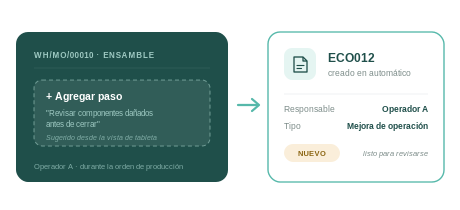
Production operators spot problems first. While working on a manufacturing order, they suggest new steps in the tablet view — the suggestion becomes an ECO at the New stage, with the operator assigned to clarify any questions.
Suggestions from the tablet during production
Each suggestion creates an ECO for review
The operator stays on record for any follow-up questions
PLM + QUALITY
Quality control checkpoints
come with the change
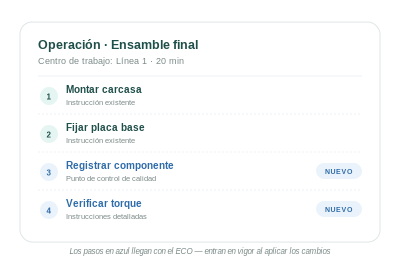
An ECO does more than change components: it can also add steps and instructions to operations — including quality control points, such as recording production of a component or following detailed assembly instructions. Review everything before applying changes.
Steps and instructions added to operations through ECOs
Quality checkpoints in the workflow (requires the Quality app)
Operational changes with a diff, just like components
APPROVE → APPLY → ARCHIVE
The new version comes in,
the previous version stays archived
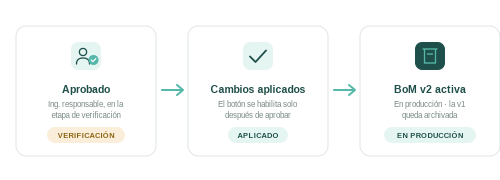
When an ECO moves to verification, approvers automatically receive an activity and notification. Once approved, Apply Changes is enabled — applying archives the original BoM and makes the revised one the new production BoM, effective immediately or on a scheduled date.
Automatic activities and notifications for approvers
Apply Changes becomes available after approval
Original BoM archived; revised version released to production
WHO IT'S FOR
If your BoMs live in files named “v3_final_THIS_TIME_FOR_REAL,” this is for you.
Manufacturers with iterative designs
Products improving every quarter — changing components, replacing suppliers, and optimizing assemblies.
Regulated industries
When regulations or customers require proof of which version was manufactured, who approved the change, and when it took effect.
Engineering + production
Teams where design and production must stay aligned — with operator suggestions turned into formal changes for review.
Teams managing versions in Excel
If your active BoM is "the one in Tuesday's email" and nobody knows what changed, ECO comparisons solve it.
FREQUENTLY ASKED QUESTIONS
What we get asked most before getting started
01 What is an engineering change order (ECO)?
An ECO is a document tracking every change to a product or bill of materials: what changes, who's responsible, when it takes effect, and its stage. ECOs allow changes to be implemented — and rolled back, with every version retained.
02 Do changes affect production while I test them?
No. Changes and tests stay within the ECO's revised BoM without affecting the production BoM. The current version remains in use until changes are approved and applied.
03 How do I see exactly what changed between versions?
The ECO has BoM and operation change tabs comparing production and revised versions, color-coded: blue for additions, black for items shared by both versions, red for removals. This applies to components, operations, and their steps.
04 How do approvals work?
Define approvers by role at each stage — usually verification, before closure. When an ECO arrives, each approver automatically receives an activity and notification. The Apply Changes button becomes available after approval when required, and every action is logged in the chatter.
05 What happens to the previous version when I apply a change?
The previous version is automatically archived, and the revised BoM becomes the new production bill of materials. Changes can take effect immediately ("as soon as possible") or on a scheduled date — making it easy to trace which version was used when.06 Can production operators suggest improvements?
Yes. During a manufacturing order, operators can propose a new step from the tablet view — an extra inspection, for example. The suggestion creates an ECO in the New stage, assigned to the operator, so whoever reviews the bill of materials can ask for clarification.
PLM connected to your entire operation

Manufacturing
Manufacturing orders always use the current BoM — operators suggest improvements from tablets that become ECOs.

Quality
Quality control points enter operations through ECOs — reviewed and approved before taking effect.

Inventory
CRM campaigns aimed at segments, with response metrics. Warm leads enter the pipeline already nurtured.

Maintenance
The sales cycle ends with an invoice issued from Odoo, using all the customer information already captured.
Tell us how you manage product changes today
A Wayakna consultant will review your situation — how many products and BoMs you manage, who approves changes and what your industry requires — and recommend the right implementation without unnecessary complexity.