6
channels to connect: Facebook, Instagram, LinkedIn, X, YouTube, and push notifications
1
1 → N
one post to multiple social networks, with a preview for each
100%
business accounts: the app manages and analyzes company pages
Social Marketing in action
DASHBOARD
Your feeds, side by side
Every connected account adds a column of posts to the dashboard, and streams can be added anytime.
PUBLISH
One post, multiple networks
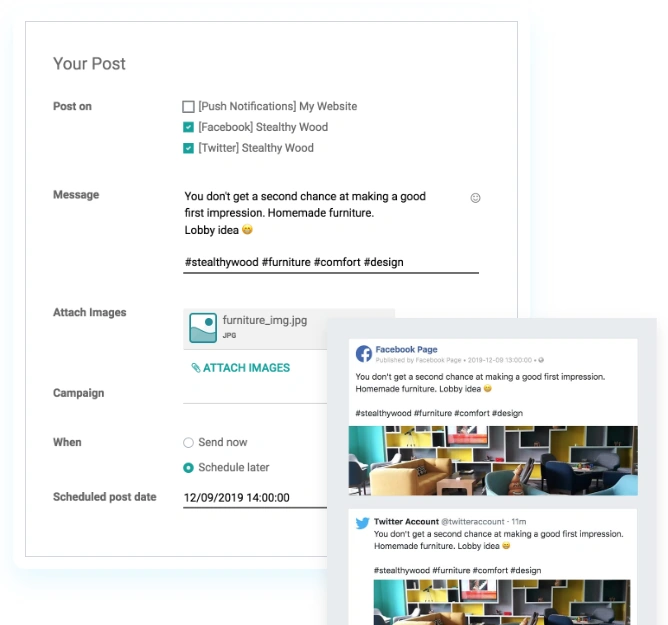
In the "Post on" field, select accounts — and the same message goes to all selected channels.
PREVIEW
How it will look on each platform
METRICS
Metrics for every account
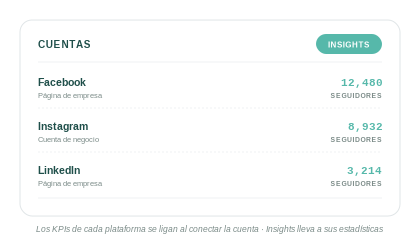
Connecting an account links its platform KPIs, and the Insights button opens its statistics.
Connected social networks, not ten open tabs
Facebook, Instagram, LinkedIn, X, YouTube and push notifications in one place
Each account’s feed in columns on one dashboard
One post published to multiple networks at once
Preview how a post will look on each selected network
Push notifications to your website visitors
Each platform’s KPIs linked to the dashboard
Everything your social networks need, already included...
Connected accounts
Facebook, Instagram, LinkedIn, X, YouTube, and push notifications — each with its own account connection button, and streams you can add whenever you wish.
The stream dashboard
Every connected account adds a post column to the main feed — all your networks side by side, without switching tabs.
Publish once, reach multiple networks
In the "Post on" field, select the networks — and websites for push notifications — where the message will appear. Every linked account shows up as an option.
Preview for each network
As you write your message, visual previews show how the post will appear on each selected network before it goes live.
Push notifications
Direct messages to website visitors who accepted notifications — another channel from the same post form.
Metrics and insights
Connecting an account links its platform KPIs to the feed, and the Insights button takes you to that account's statistics.
Write it once,
and preview how it looks on each network
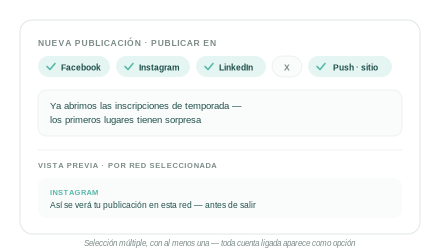
In the post form, select where it will appear: all linked accounts — plus websites for push notifications — are available, and you can choose multiple at once. As you write, Odoo displays previews for each selected network before posting.
Select multiple networks and websites in one field
Every linked account appears automatically as an option
Visual preview for each selected network
A channel that doesn't depend
from no one's algorithm
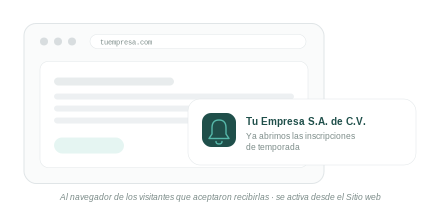
Push notifications go directly to the browsers of website visitors who opted in — without fighting organic reach. Enable them in Website, and they become another destination in the same form used for social posts.
Browser notifications for users who opt in
Enable these options in Website settings
Sent directly from the publishing form
SOCIAL + METRICS
The numbers for each network,
without leaving the dashboard
Platform KPIs linked when an account is added
Insights button for each account, linking to its statistics
Engagement from every stream visible on the dashboard
WHO IT'S FOR
If publishing means opening five apps and hoping you remember them all, this is for you.
Post the same update to Facebook, Instagram, and LinkedIn at once — with previews for each network before publishing.
One person handles every account — a column-based dashboard saves them from juggling countless browser tabs each morning.
Teams that report results
Each platform's KPIs linked to the dashboard, with Insights one click away — no screenshots needed for monthly reports.
FREQUENTLY ASKED QUESTIONS
What we get asked most before getting started
01 Which social networks can I connect?
Facebook, Instagram, LinkedIn, X (Twitter), and YouTube, plus website push notifications. Each has a Link Account button in settings, and accounts and streams can be added anytime.
02 Can I post to several social networks at once?
Yes. The "Post on" field shows all connected accounts — including websites for push notifications — so you can select whichever you need. Multiple accounts are allowed, with at least one required. As you write, previews show how the message will appear on each selected network.
03 How does the stream dashboard work?
Each connected account adds a column of posts to the main feed, with your social networks side by side on a single dashboard. Add different pages as separate streams whenever you want.
04 Does it work with personal accounts?
05 What are push notifications?
06 Which metrics can I see?
Social Marketing connected to your entire operation

Email Marketing
The other side of your campaigns: emails with clean lists, A/B testing, and scheduling in the same system.

Website
The basis for push notifications — and the natural destination for traffic generated by posts.

CRM
A pipeline for prospects who arrive from social networks — tracked all the way to closing.

Business Intelligence
Connect social channels to sales: see which network and campaign really move the needle for your business.
Tell us how you manage social media today
A Wayakna consultant will review your situation — which social networks you use, who publishes content and how you measure results today — and recommend the right implementation without unnecessary complexity.