Skip to Content

1

shared karma: a user's points apply across all forums and courses on the same website

2

settings tabs: how much karma each action earns and how much each privilege requires

5

tags per post, maximum — so filters stay useful

∞

badges: awarded manually or automatically upon completing challenges

Forum in action

QUESTION
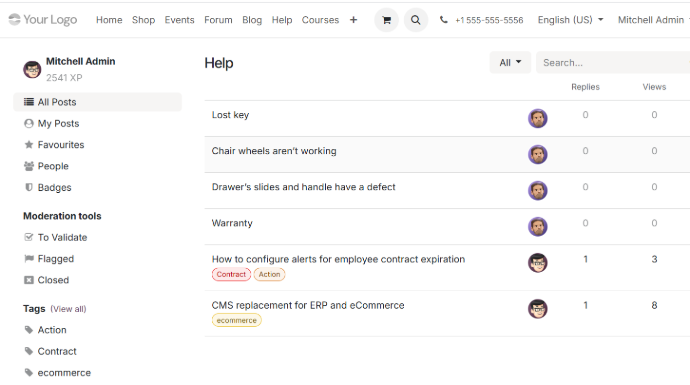
The format you already know
Questions, answers, and community votes on what helps.

KARMA
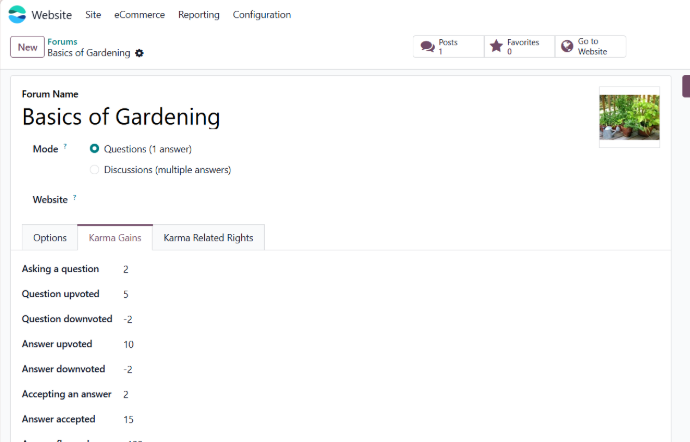
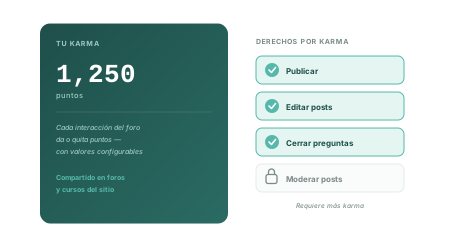
Points for contributing
Configurable karma earnings and karma permissions tabs.

RECOGNITION
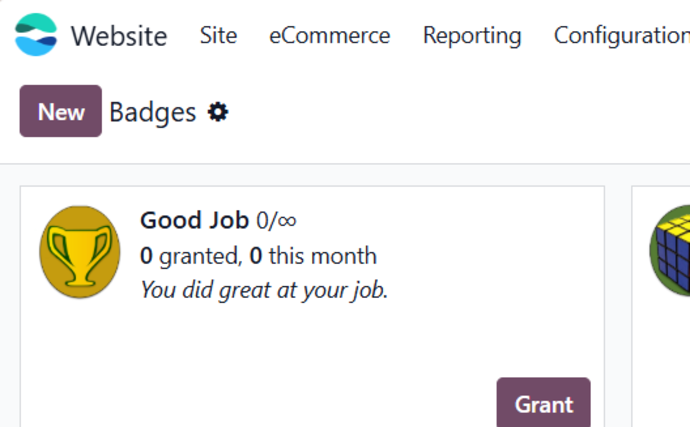
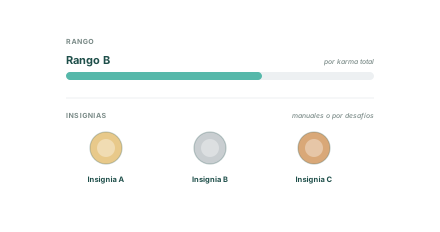
Levels and badges
Ranks for accumulated karma and badges for completed challenges.

MODERATION

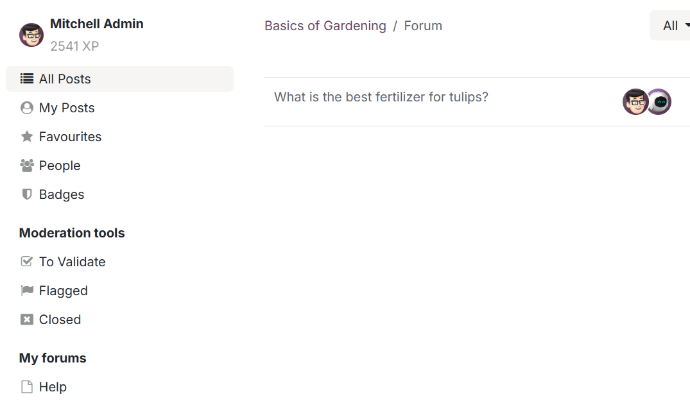
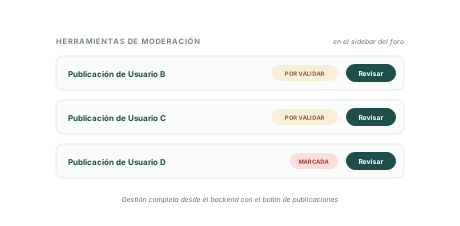
Tools at your fingertips
The moderation section in the forum sidebar.

A community governed by clear rules
Odoo Forum brings the model of major Q&A communities to your site: karma reflects the trust your community places in each user, and those points — configurable for each action — determine who can edit, close, and moderate. You set the rules; the community does the rest.

Questions and answers published on your website

 Karma for interactions: each action earns or loses points

 Permissions unlocked by karma level

 Levels based on accumulated karma

 Manual badges or automatic badges awarded for challenges
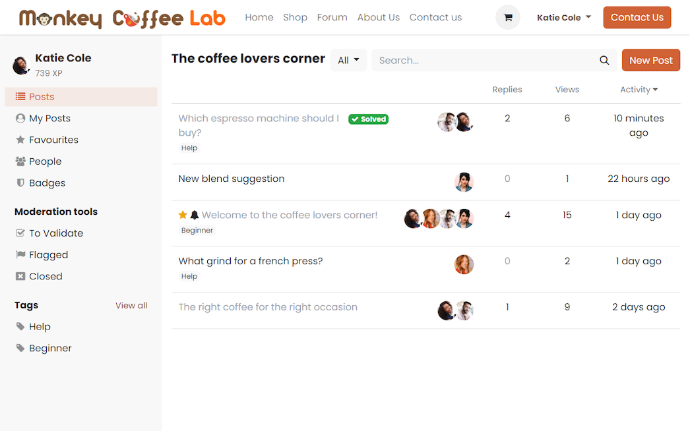
 Tags (up to 5 per post) and built-in moderation

Everything you need, already included...

1

Configurable karma
The karma gains tab defines how many points each forum interaction earns or loses, with default values you can customize.
2

Permissions earned through points
The Karma Rights tab sets point requirements for each feature, from posting without approval to accessing all moderation tools.

3

One shared karma score
User points are shared across every forum and course on the same site — build your reputation once and use it everywhere.

4

Levels and badges
Ranks recognize accumulated karma; badges are awarded manually or automatically for completing challenges — both managed in settings.

5

Tags with limits
Up to five tags per post, managed centrally and filterable through the sidebar — enough to organize, few enough to stay focused.


6

Moderation tools at hand
Moderation tools are available in the forum sidebar, while the Posts button in settings lets you manage everything from the backend.

FORUM + KARMA

Trust is measured

and opens doors
Each forum interaction earns or loses karma points according to values you configure in the earnings tab — and the permissions tab determines the points each feature requires. Active contributors progressively unlock more capabilities, up to full moderation tools.

 Configurable karma gains by action

 Karma-based permissions: from posting to moderating

 Karma shared across website forums and courses
FORUM + RECOGNITION

Ranges based on career progression,

badges for achievements
Ranks reflect total karma accumulated over time, while badges reward milestones: awarded manually or automatically for challenges. Two recognition systems that keep your community engaged.

 Levels based on total karma

 Manual or automatic badges

 Challenges that award badges when completed


FORUM + MODERATION

The tools where

passes the conversation along
The forum sidebar provides moderators' essential tools directly in the frontend — while the Posts button in settings lets you manage every post from the backend when you need a complete view.

 Moderation tools in the sidebar

 Full post management from the backend

 Moderation access determined by karma

WHO IT'S FOR 

If your customers ask each other questions your team answers one by one, this is for you.


Products with communities
Users answer each other's questions — and the answer stays published for the next person.


Teams that also provide training
Forum alongside courses, with karma shared between them.


Teams providing recurring support
Frequently asked questions answered once and searchable by tag.


Brands building an audience
A dedicated space for your community to grow with clear rules.

FREQUENTLY ASKED QUESTIONS

What we get asked most before getting started

01 How does karma work?
Each forum interaction earns or loses points based on default values you can change in the forum's karma earnings tab. These points measure community trust and unlock features.

02 What does karma unlock?
Whatever you define: the karma permissions tab sets points needed for each forum feature, from basic actions to moderating posts with full moderation tools.

03 Is karma separate for each forum?

No — user points are shared across every forum, course, and other area of the same Odoo site. Build your reputation once.

04 What are levels and badges?

Two forms of recognition: ranks are based on total accumulated karma, while badges are granted manually or automatically for completing challenges. Create and edit badges in forum settings.

05 How are posts organized?

With tags — up to five per post. The forum sidebar has a tag section to filter questions by topic, and you manage tags from settings.

06 How is moderation handled?
Right from the forum: the sidebar provides essential frontend moderation tools. For a complete view, use the Posts button in forum settings to see all posts in the backend.

CRM connected to your entire operation


Website Builder

A won opportunity becomes a quotation, order and invoice with one click — without re-entering products, prices or terms.

View module →


eLearning

Forms and Live Chat connected directly to CRM. Every visit to your website can become a tracked lead.

View module →


Blog

CRM campaigns aimed at segments, with response metrics. Warm leads enter the pipeline already nurtured.

View module →


Live Chat

The sales cycle ends with an invoice issued from Odoo, using all the customer information already captured.

View module →

Tell us what kind of community you want to build

A Wayakna consultant will review your situation and recommend the right implementation without unnecessary complexity.