1
a bridge box: the IoT Box connects your physical devices to the system
2
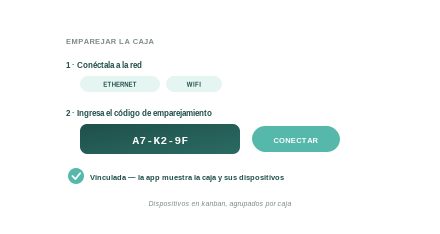
ways to connect it to the network: Ethernet cable or WiFi
1
pairing code to link the cash register to your database
0
intermediate data entry: device data reaches Odoo in real time
IoT App in action
APP
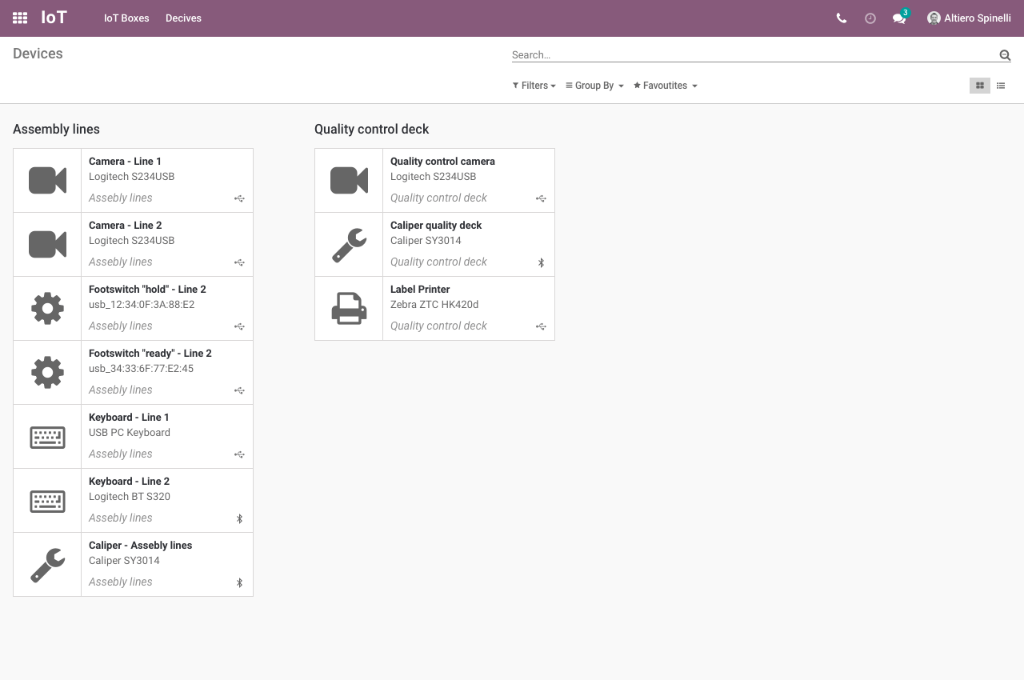
Your IoT boxes and devices
Each IoT Box with its connected devices.
MATCH
Just scan the code
SCALE
Weight directly on the ticket
Weigh products and see the weight in the order without typing.
TERMINAL
Connected payments
Payment terminals communicating with Point of Sale checkout.
Point-of-sale hardware finally connected to your system
The IoT Box collects data from connected devices and sends it securely to Odoo in real time. The app organizes everything: boxes, devices connected to each — on a Kanban board grouped by box — and settings, including reports linked to IoT printers for automatic printing.
IoT Box bridges devices and the system
Printers, scanners, scales, terminals and displays
Ethernet or WiFi connection with pairing code
Data transmitted to Odoo in real time
Devices on a Kanban board, grouped by box
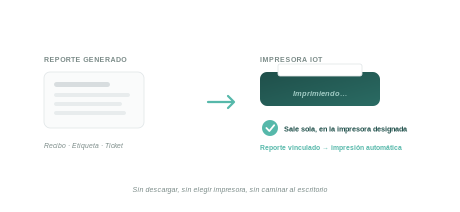
Reports linked to printers for automatic printing
Everything your event needs, already included...
One point of sale, many devices
The IoT Box connects your business peripherals — receipt printers, scanners, scales, cash drawers, payment terminals, and customer displays — to your Odoo database.
Pair devices without an engineer
Connect the box to the network over Ethernet or Wi-Fi, enter the pairing code, and link it to your database.
Everything at a glance
The app displays your IoT boxes and their connected devices — with a Kanban device menu grouped by box.
Built for Point of Sale
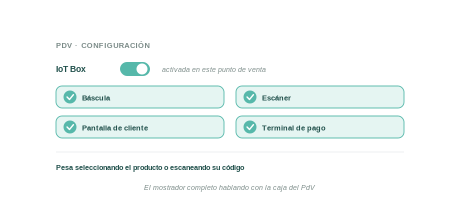
In PoS settings, enable IoT Box and choose the devices for that location: scales add weights to receipts, scanners add products, and customer displays show orders.
Automatic printing
Real time, for real
The box securely collects device data and sends it to Odoo in real time — what happens at the counter happens in the system.
IOT + POINT OF SALE
The complete checkout counter,
talking to the point of sale
Point of Sale integrates with familiar hardware: payment terminals, customer displays, scales, barcode scanners, and printers. Enable IoT Box in PoS settings, select the devices for that location, and scale weights go directly into orders when you choose or scan products.
Terminals, scales, scanners and displays
IoT Box activated from the point of sale
Weight goes straight into the order without typing
IOT + PAIRING
Connect the point of sale,
pick up a code
The IoT Box connects to the internet via Ethernet or Wi-Fi and pairs with your database using a code. The app then displays each box and its connected devices.
Ethernet or WiFi, whichever works best
Just enter the pairing code
All devices for each register clearly displayed
IOT + PRINTING
The right report
on the right printer
Reports linked to IoT printers print automatically: documents generated by your workflow go straight to designated printers — receipts at checkout, labels where needed — without downloading, selecting a printer, or walking to a desk.
Automatic printing when generated
Each document sent to its designated printer
WHO IT'S FOR
If your scale, printer and system don't talk to each other, this is for you.
Stores with sales counters
Scale, scanner, cash drawer, and customer display all talking to Point of Sale.
Operations that print a lot
Receipts and reports printing automatically on the right printer.
Businesses that sell by weight
Scale weights go straight to the order — no typing or guessing rounding.
Registers with payment terminals
Electronic payments connected to the Point of Sale workflow.
FREQUENTLY ASKED QUESTIONS
What we get asked most before getting started
01 What is the IoT Box?
The bridge between physical devices and Odoo: a hub connecting printers, scanners, scales, payment terminals, and displays to your database — collecting data and securely sending it to your system in real time.
02 Which devices can I connect?
Typical equipment: receipt printers, barcode scanners, scales, cash drawers, payment terminals, and customer displays — check Odoo's compatibility list for each device.
03 How is the point of sale connected?
On the network via Ethernet or Wi-Fi; in your database via pairing code. Once linked, IoT displays the box and its connected devices
04 How do I use it in Point of Sale?
In PoS settings, enable IoT Box and select the devices for that store — scales, scanners, printers, customer displays, and terminals. To weigh a product, select it on the order or scan its code.
05 What is automatic printing?
Reports linked to IoT printers: documents print automatically on designated printers when generated — and the app lists each report's assigned printer.
06 What do I need to get started?
An IoT Box with its power supply, a device with an up-to-date browser, your Odoo database with the necessary apps installed, the local network, and compatible peripherals for your operation.
Your hardware connected to your entire operation

Point of Sale for Retail
The Point of Sale where the IoT Box shines: scales, scanners, and displays.


