Skip to Content

30

minutes without activity before an operator is marked offline — the channel always knows who's available

1

shortcut (:) to insert a complete canned response into the conversation

3

chatbot step types: text, multiple-choice questions, and conditional "only if" steps

100%

session records with transcripts, participants, duration, and ratings.

Live Chat in action

THE CHAT

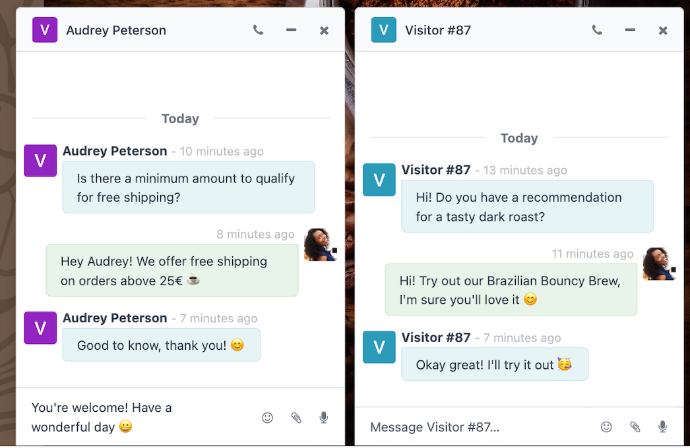
Conversation on your website

The button, welcome message, and conversation with the operator.
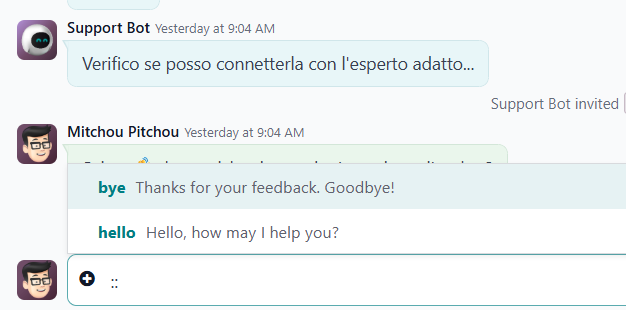
REPLIES

Shortcuts for frequent tasks

Type the shortcut with a colon, and the complete response is inserted.
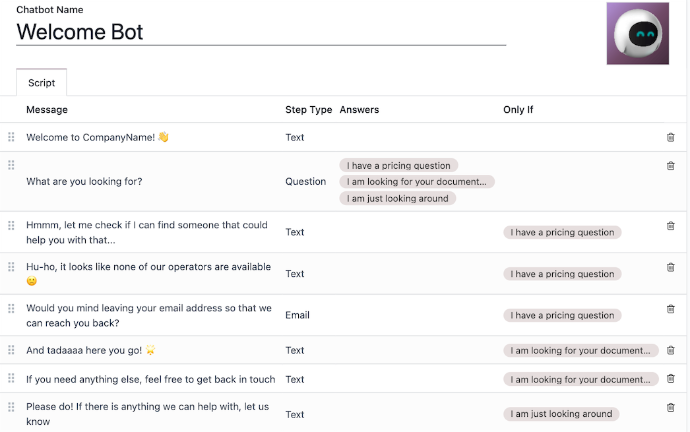
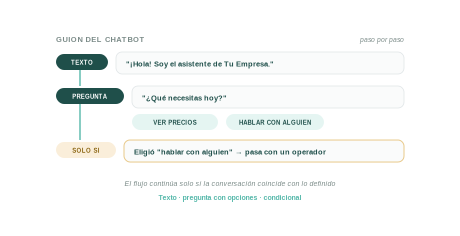
CHATBOT

Step-by-step script

Text, multiple-choice questions and conditions to build the flow.
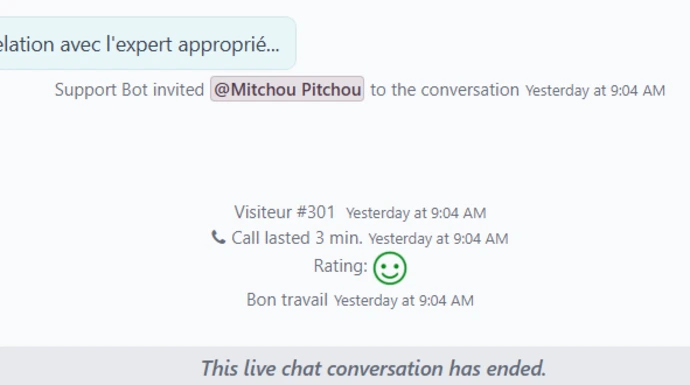
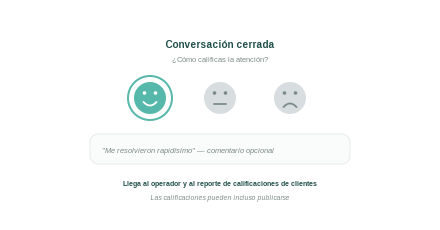
RATING

Customers rate their experience upon closing

The rating and comment reach the operator and appear in the report.

Conversations start on your website and stay in your system
Odoo Live Chat integrates automatically with your Odoo website and can also be embedded in non-Odoo sites via a widget. Operators join channels and reply from Odoo, with canned responses, commands, and chatbots whenever useful. Every session is saved with its rating.

Chat channel where operators can join and leave

 Configurable button text and welcome message

 Canned replies inserted with shortcuts

 Chatbots with step-by-step scripts

 Customer rating and comment upon closing
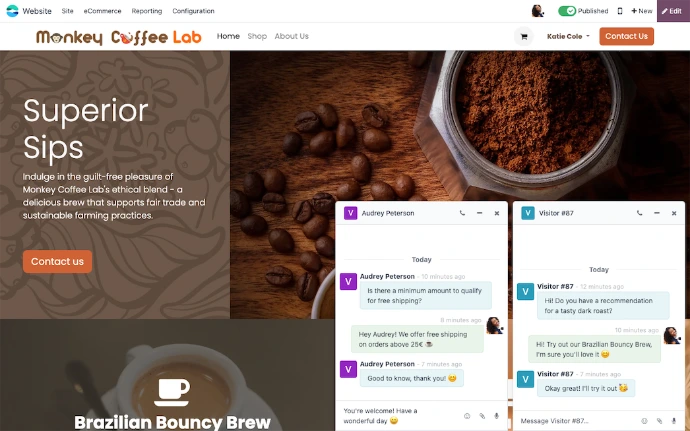
 Session history with transcripts and duration

Everything you need, already included...

1

Channels with operators

Add as many operators as you want to a channel — joining or leaving takes one click, and anyone inactive in Odoo for over 30 minutes is marked offline.

2

From website to system

The chat button label, automatic welcome message at the start of conversations, and invitation to chat — all configurable.

3

Registration desk

FAQs are handled through shortcuts: type a colon and a short command, and the complete answer appears — consistently, in seconds.

4

Scripted chatbots 

Build the flow step by step: the bot greets or informs using text, asks questions with a set of options, and branches using conditional "only if" steps based on the conversation.

5

Rating upon closing

Customers close the chat and rate the service — with the option to explain why. Ratings reach the operator and appear in the customer ratings report.

6

Complete history

Every session is documented: transcript, participants, date, duration, and rating — for auditing, training, and improvement.

CHAT + CANNED REPLIES

The usual questions,

answered in two keystrokes
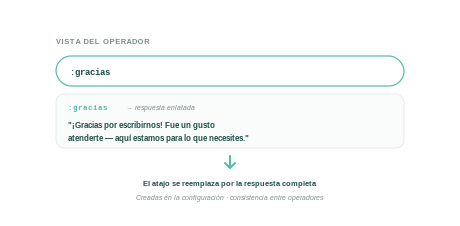
Canned responses are predefined replacements: a short command expands into a well-crafted answer. Operators type a colon and shortcut, then pick from suggested replies. Save time and keep a consistent tone in every conversation.

 Colon shortcuts (:shortcut)

 Replies created from settings

 Consistency across all operators
CHAT + CHATBOTS

The bot responds first,

your team when needed
Build chatbots with a step-by-step script: text to greet or inform, questions with answer options, and conditional "only if" steps that continue when conversations meet defined criteria. Visitors move through automatically — and your team steps in where it adds value.

 Text step: greetings and information

 Question step with answer choices

 Conditional "only if" step for branching

CHAT + RATINGS

The customer rates the service

and you know about it
When a conversation ends, customers rate the service and can add a comment — both arrive with the operator, including a rating icon. All results are collected in a ratings report, and ratings can even be published.

 Rating when the conversation closes

 Optional comment sent to the operator

 Customer ratings report

WHO IT'S FOR 

If visitors leave with unanswered questions because emailing takes too much effort, this is for you.
 
Online stores

Businesses needing real pipeline visibility without requesting manual reports every Monday.

 
Support teams
Canned replies and full conversation histories for fast, consistent support.


Teams answering the same questions a thousand times
A chatbot that filters and answers routine questions before escalating them.


Businesses measuring service quality
Conversation ratings and reports to drive real improvement.

FREQUENTLY ASKED QUESTIONS

What we get asked most before getting started

01 How does Live Chat appear on my website?

If your site uses Odoo, installing the app adds it automatically — you just configure the channel. For non-Odoo sites, embed its widget.

02 Who replies?
Channel operators: add as many as you want and let each join or leave with one click. Operators inactive in Odoo for more than 30 minutes are marked offline, so channels reflect who's actually available.

03 What can I customize in Live Chat?

The chat button label, automatic welcome message visitors see when conversations begin, and invitation text.

04 What are canned replies?
Preconfigured substitutions: a short command expands into a long reply. Operators type a colon and shortcut — or open the list of available answers — to insert the full text. Set them up in chat settings.

05 How do chatbots work?

With a step-by-step script you design: text steps to greet or inform, questions offering visitors possible answers, and conditional "only if" steps that continue the flow only when the conversation matches defined rules.

06 How do I know whether customers received good service?
When customers close a conversation, they rate service and can explain their rating — operators receive the comment and icon. All ratings are collected in the customer ratings report, and each session retains its transcript, participants, date, and duration.

Your customer service connected to your entire operation


Website Builder

The website where your chat button lives — same database, same visitors.

View module →


CRM

Conversations that become sales opportunities.

View module →


eCommerce

Questions answered at the exact moment of purchase.

View module →


Surveys

When a chat rating calls for a more in-depth assessment.

View module →

Tell us how you assist website visitors today

A Wayakna consultant will review your situation and recommend the right implementation without unnecessary complexity.