<5min
to sign from any device, with no account or app required
0
printing, scanning, or sending through messaging apps
100%
traceable: who signed, when, and from which device
∞
reusable templates for frequently used documents
Sign in action
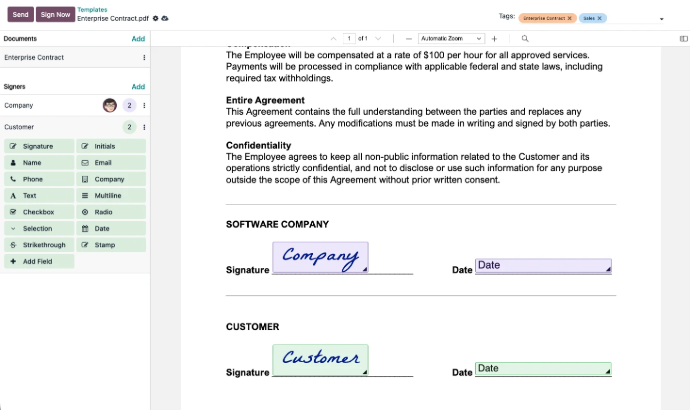
PREPARE
Drag-and-drop fields on the PDF
Upload documents and drag fields into position: signature, initials, name, date, checkboxes. Assign each field to its signer.
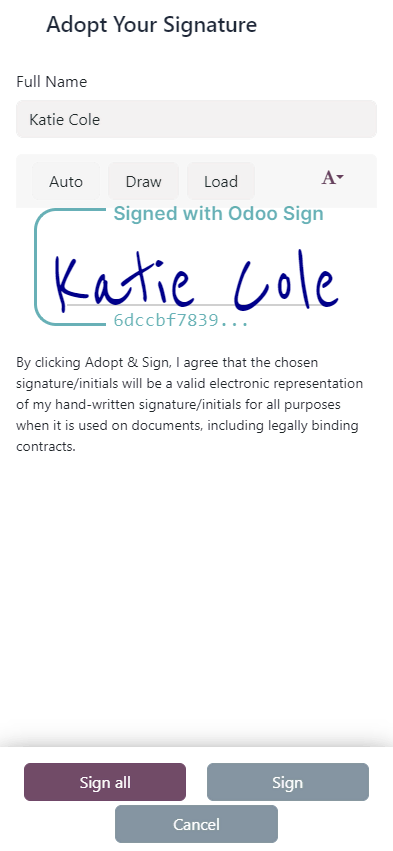
SIGN
Signers can sign from anywhere
Signers receive an email link, open it in their browser — including mobile — and sign by drawing, typing, or uploading a signature. No account needed.
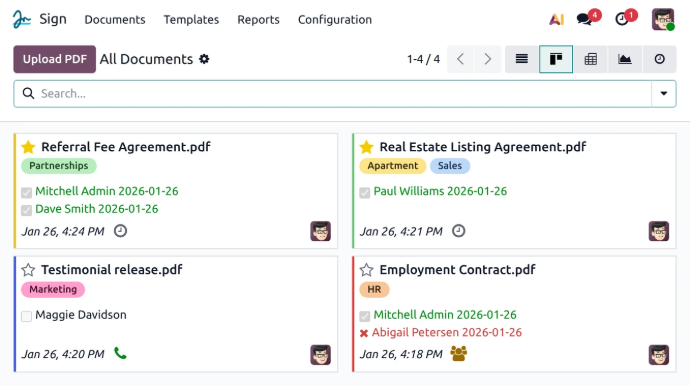
TRACKING
Who's signed and who's still pending
The dashboard displays documents with their signers and statuses. Reminders go out automatically to anyone who hasn't signed.
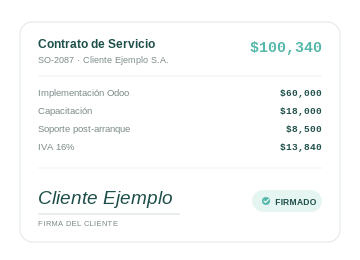
AUTOMATION
Certificate of completion
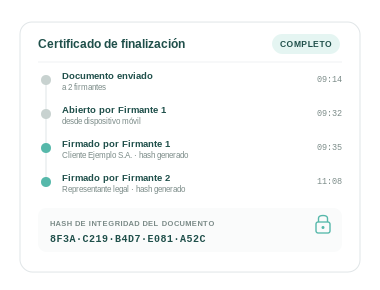
Every completed document includes a certificate with the full history: sending, opening, timestamped signatures, and a hash ensuring document integrity.
Connected signatures, not isolated
Odoo Sign isn't another isolated subscription. Contracts originate in Odoo, are signed, and return to Odoo — linked to the right employee, customer, or sale, with a completion certificate attached.
Drag-and-drop fields: signature, initials, name, date and checkboxes
Multiple signers, in sequential or parallel order
Signers need no account or software installation
Automatic reminders for people who haven't signed
Completion certificate with history and integrity hash
Reusable templates for frequently used documents
Everything your signing workflow needs, already included...
Drag-and-drop fields
Signatures, initials, name, email, date, free text, and checkboxes — placed on the PDF exactly where needed.
Multiple signers in order
Define roles (employee, customer, representative) and signing order: sequential — one after another — or all in parallel.
Sign from anywhere
Signers receive a link, open it in their phone or computer browser, and sign by drawing, typing, or uploading their signature.
Automatic reminders
Anyone who hasn't signed receives reminders on the schedule you define — no chasing people by phone.
Certificate of completion
Once completed, the document and certificate are sent to signers — with a history of sends, opens, and signatures, and a hash for each signature to ensure integrity.
Reusable templates
Metrics by salesperson, product and stage. Sales forecasts based on actual probabilities.
SIGN + HUMAN RESOURCES
Onboarding
without a single printed page
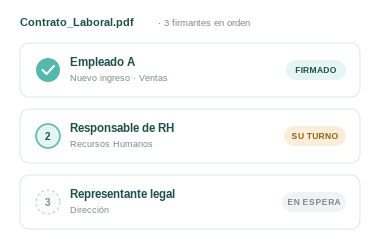
New hires sign contracts, privacy notices, and acknowledgments before day one — from their phones. Signed documents return to their personnel records in order: first the employee, then the company representative.
Employment contract with template-based fields
Signing order: employee first, company second
Signed document added directly to the employee record
SIGN + SALES
From “yes, I want it”
to the signed contract
Approved quotations create service contracts with customer details, amounts, and terms already completed. Customers sign by email and the sale closes with a signed document attached, without re-entering data.
Contract generated from a quotation with prefilled details
Customers sign directly from their email
Signed document attached to the sales order
SIGN + TRACEABILITY
Certificate of completion
in every document
Every signature creates a hash — a unique digital fingerprint ensuring traceability and preventing changes to the document. Once complete, the document and completion certificate are sent to all signers, with the full history recorded.
Sending, opening and signing history with timestamps and IP addresses
Hash for every signature: any later modification is detected
Additional SMS authentication available for sensitive signatures
WHO IT'S FOR
If your contracts are printed, scanned and sent through couriers, this is for you.
Human Resources
Frequent hiring with contracts, privacy notices, and acknowledgments awaiting signature — currently printed, signed by hand, and scanned into personnel files.
B2B Sales
Service contracts and agreements that take weeks to come back signed — while the sale cools off and the project start is delayed.
Legal and administrative teams
Agreements, amendments, and internal authorizations that require multiple signers in sequence, with proof of who signed and when.
Remote teams and customers
Signers in other cities or countries. Shipping physical documents costs days and money — signing links arrive in seconds.
FREQUENTLY ASKED QUESTIONS
What we get asked most before getting started
01 Is Odoo's electronic signature legally valid in Mexico?
For most private commercial agreements, yes. In Mexico, electronic signatures are governed by the Federal Civil Code, Commercial Code, and state civil codes, recognizing their legal validity alongside handwritten signatures when methods reliably identify signers and protect document integrity. Odoo logs consent, timestamps, IP addresses, and file integrity. NOM-151-SCFI-2016 also establishes requirements for preserving electronic records. For specific cases, always consult legal counsel.
02 Is it the same as SAT's e.firma (formerly FIEL)?
No, and the distinction matters. The e.firma is an advanced electronic signature issued by SAT with a digital certificate, required for tax and government procedures. Odoo Sign is a simple electronic signature with traceability — intended for private contracts between businesses and individuals, not SAT procedures.
03 Which documents should NOT be signed this way?
Documents requiring a notary or special formalities by law, such as public deeds, certain notarized powers of attorney, or some negotiable instruments. Electronic signatures work for everyday commercial operations — service and employment contracts, NDAs, supplier agreements, purchase orders. Ask legal counsel about specific documents when unsure.
04 Do signers need an Odoo account or to install an app?
No. Signers receive a link by email, open it in any browser — including on phones — and sign with their finger, by typing a name, or by uploading a signature image. No registration or downloads.
05 How do I know the document wasn't altered after signing?
Every signature creates a hash — a unique digital fingerprint of that action — ensuring traceability, integrity, and tamper resistance. Changes made after signing can be detected. The completion certificate also preserves the full timestamped history and IP addresses.
06 Can I define the signing order for multiple people?
Yes. Sequentially — the second person signs after the first — or in parallel, all at once. Each signer has a role (employee, customer, representative) and their own fields, and reminders go automatically to anyone who hasn't signed.
Sign connected to your entire operation

Documents
Send any workspace document for signature with one click — and get the signed copy back in the same place with its completion certificate.

Employees
Contracts, privacy notices, and onboarding acknowledgments signed before day one — straight into the employee's record.

Sales
Service contracts are generated from approved quotations, customers sign them via email, and documents are attached to the sale.

CRM
NDAs and proposals are signed during the sales cycle — with signature histories on the opportunity.
Tell us which documents you still sign on paper
A Wayakna consultant will review your workflow — how many contracts you sign each month, how many signers are involved and how long the process takes today — and recommend a practical way to digitize it without unnecessary complexity.