2
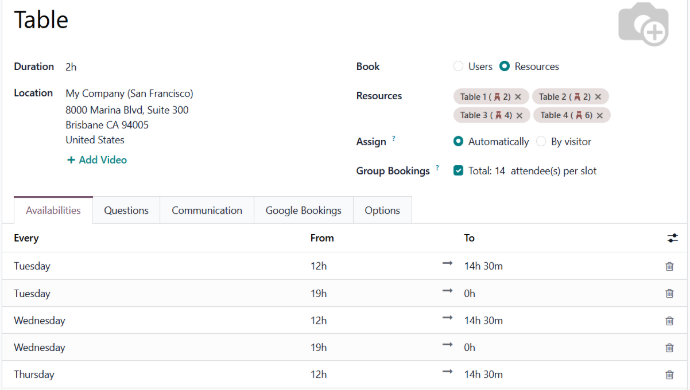
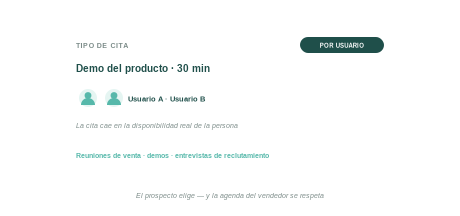
availability options: by user or by resources such as rooms and areas
1
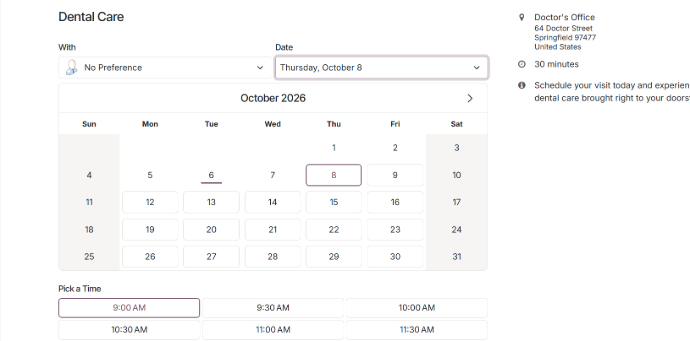
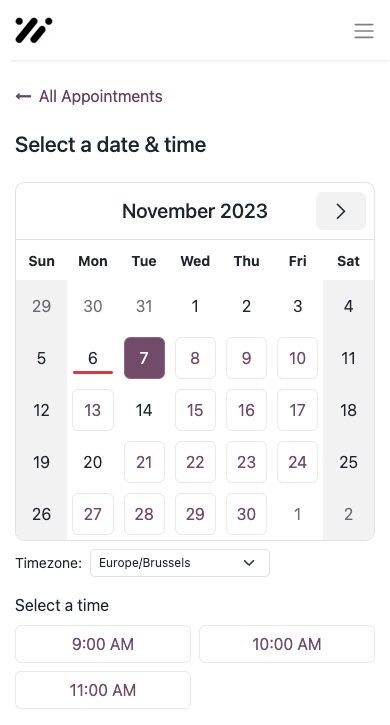
a self-service booking page — customers choose their date and time
12
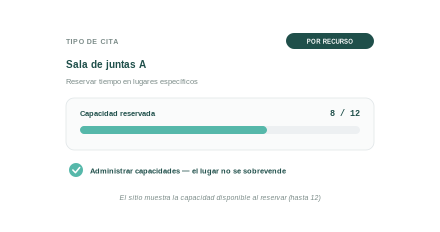
maximum capacity displayed when booking a resource online
0
Appointments in action
BOOKING
Customers choose
APPOINTMENT TYPES
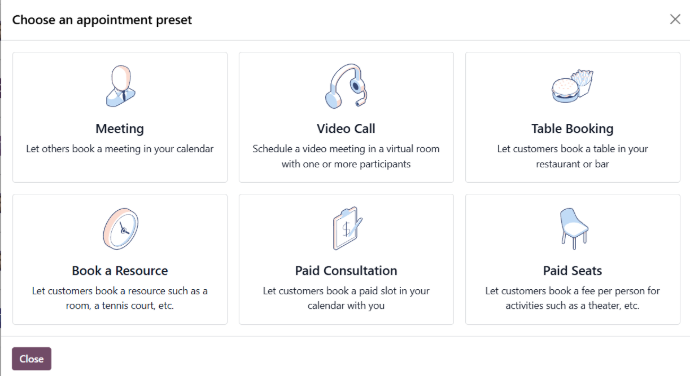
Every appointment, its own rules
SCHEDULES
When it applies
REMINDERS
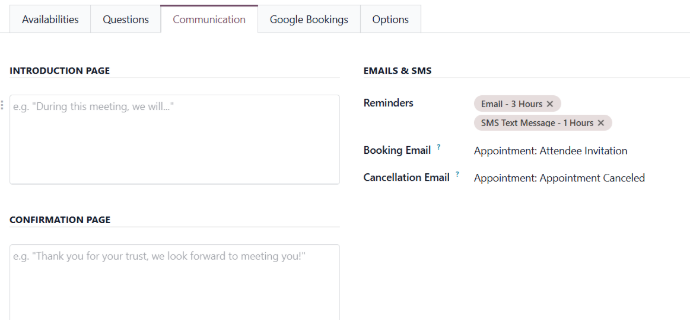
Nobody forgets
Appointments scheduled without manual back-and-forth
Appointments is Odoo's self-service scheduling app: simplify bookings for meetings, consultations, and services, automate scheduling, reduce manual coordination, and offer customers a seamless experience — integrated with the rest of Odoo so appointments live alongside your operations.
Self-service booking: customers choose a date and time
Appointment types based on users or resources
Forward booking window in days
Schedules that define available time slots
Customer reminders before appointments
Everything you need, already included...
Appointment types
Before accepting bookings, define the appointment type, name, duration, and rules — each service or meeting with its own configuration.
By person or location
Availability can be based on users — ideal for sales meetings, demos, and Recruitment interviews — or on resources such as rooms and areas, with capacity management.
Advance notice governed by rules
Advance notice requires bookings a minimum time ahead — for example, at least one hour — and the future booking window defines how far ahead appointments can be made.
Schedules set the rules
The appointment type's Schedule tab defines availability and the slots shown on booking pages.
Reminders
The reminders field specifies how customers are contacted before their appointment — so booked meetings actually happen.
Visible descriptions
Whatever you enter in the Description tab is shown to customers during online booking — clear context before confirmation.
Meetings that schedule themselves
without exchanging emails
Sales meetings and demos
Recruitment interviews
Real-time availability for each user
Rooms and seats,
with their capacity accounted for
Bookable rooms, areas, and locations
Capacity management by resource
Available capacity displayed when booking online
The calendar opens
on your terms
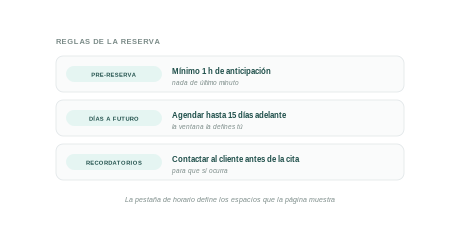
Advance notice prevents last-minute bookings — set it to one hour to require at least an hour's notice — while the future booking window limits how far ahead people can schedule. The Schedule tab sets available slots, and reminders notify customers before appointments.
Configurable minimum advance notice
Up to X days ahead
Reminders before appointments
WHO IT'S FOR
If booking with you takes five emails and two phone calls, this is for you.
Sales teams
Demos and meetings booked by prospects themselves in the salesperson's calendar.
Medical practices and services
Recruitment
Interviews candidates book based on actual availability.
Bookable spaces
Rooms and areas with capacity management, no overbooking.
FREQUENTLY ASKED QUESTIONS
What we get asked most before getting started
01 What do I need to start accepting appointments?
Create an appointment type from the app dashboard with its name, duration, and rules. The booking page then displays available times for that type.
02 Whose availability is used?
03 Can I limit a location's capacity?
Yes — choosing resource-based availability enables capacity management. For resource bookings, the website shows available capacity up to twelve
04 Can people book an appointment just 10 minutes ahead?
Not if you set minimum advance notice: one hour means appointments must be booked at least an hour ahead. The future booking window determines how far ahead customers can schedule.
05 How do I control the appointment times offered?
06 Will customers receive a reminder before their appointment?
Yes — reminders determine how customers are contacted before appointment times. Appointment descriptions are visible during online booking.


