1
one employee file: personal details, contracts, equipment, and documents
0
Excel sheets for the staff directory and organization chart
360°
complete profile: skills, certifications, courses, and badges
RFID
badges with barcodes or RFID generated by the system
Employees in action
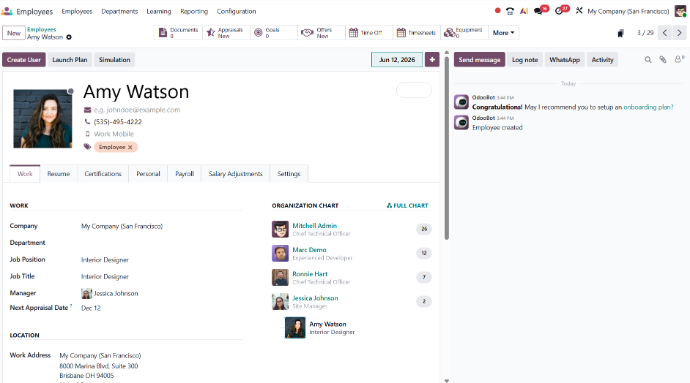
DIRECTORY
Your full, filterable template
Search and filter employees by department, position, experience, education, or certifications. The directory is always up to date.
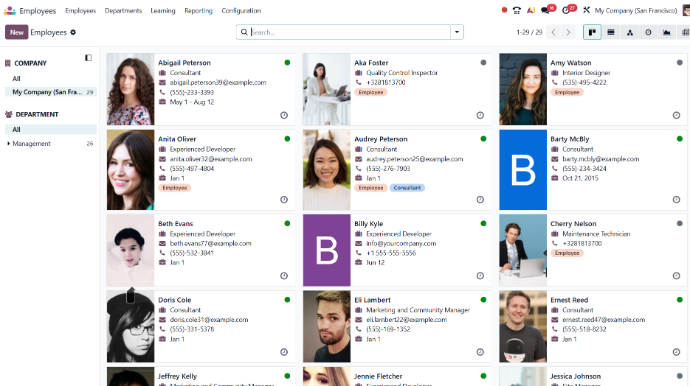
RECORD
The employee record
Work, personal and HR information in tabs, with smart buttons linking to their documents, absences, courses and assigned equipment.
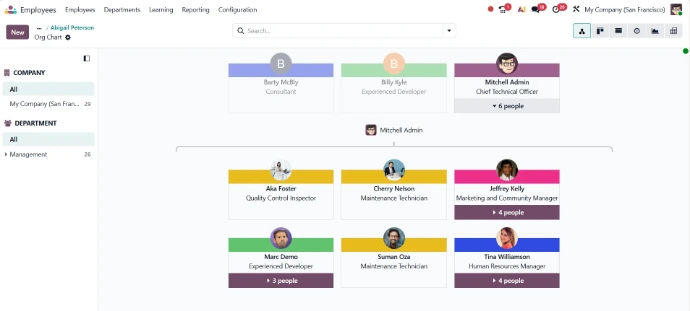
ORGANIZATION CHART
The structure, visible on every profile
Departments with hierarchies, direct manager and subordinates. The org chart appears on every profile and updates automatically.
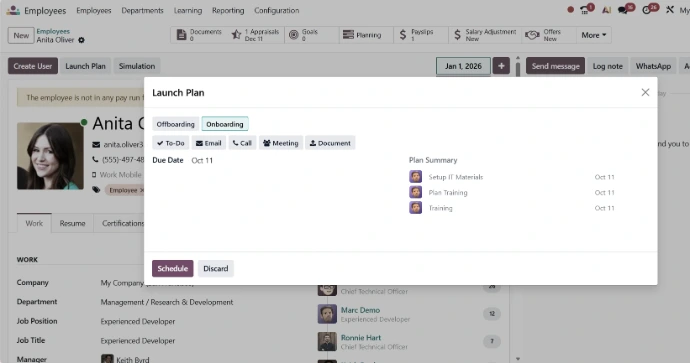
ONBOARDING
Onboarding with an activity plan
Customizable onboarding and offboarding plans. Each new hire arrives with their assigned activities and nothing is left pending.
Connected HR, not isolated
Odoo Employees isn't a list of contacts with folders on the side. It's the central personnel record connected to Attendances, Time Off, Payroll, Expenses, and Documents — a change in one place is reflected everywhere.
Complete employee record: details, contracts and assigned equipment
Organizational chart with departments, managers and direct reports
CV with skills, experience and certifications
Customizable onboarding and offboarding plans
Early alerts for expiring contracts and permits
Access levels: everyone sees only what they need
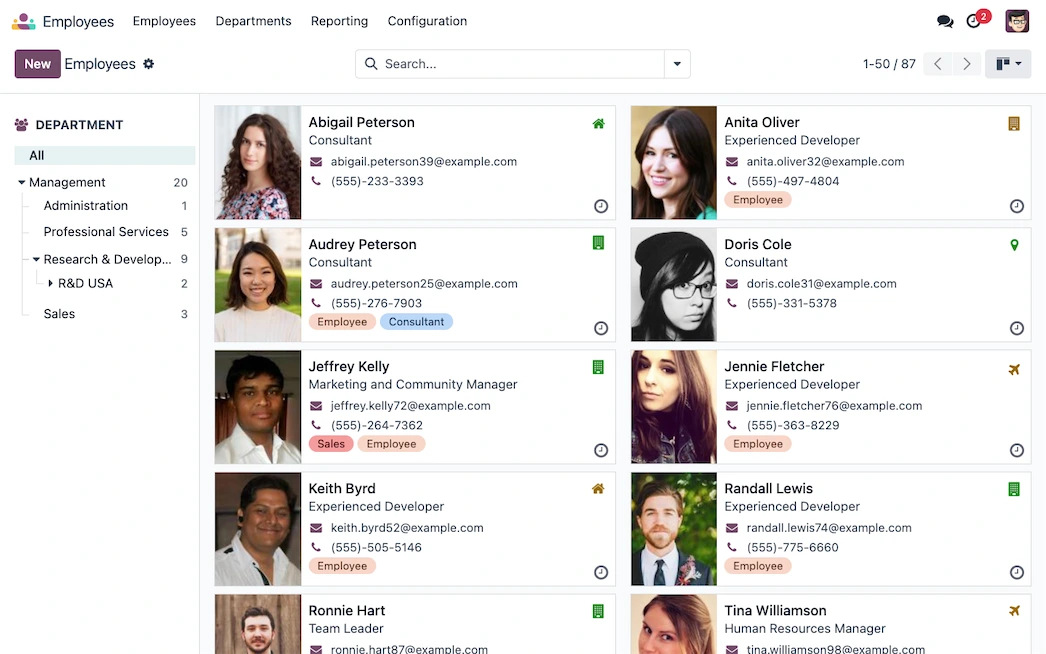
Everything your people management needs, already included...
Centralized employee records
Automatic org chart
Departments with hierarchies (and parent departments), direct managers, and reports. Visible on every profile, without drawing it manually.
Skills and certifications
Employee profiles with work experience, education, and skill levels. Certifications include validity periods and status.
Onboarding and offboarding
Customizable onboarding and offboarding plans with assigned activities, ensuring every arrival and departure follows the full process.
Assigned equipment
Laptops, phones, tools, uniforms. Record equipment assigned to employees and recover it all when they leave.
Work location and schedule
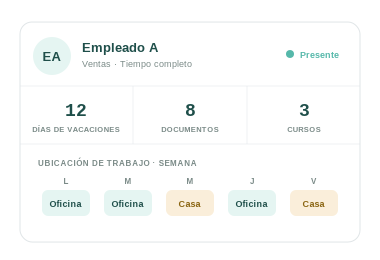
Schedules, time zones, and work locations by weekday — office, home, or elsewhere. All configurable per employee.
Employees + Attendances . Time Off
The record that knows
who's here and who's away
The dashboard shows attendance and work locations for every employee in real time. From employee records, see remaining vacation days and open requests, with approvers for time off, expenses, and timesheets assigned per employee.
Real-time attendance and work location
Remaining vacation days visible in the employee record
Approvers for expenses, time off and hours by employee
EMPLOYEES + SIGN
Signed documents
from the employee record
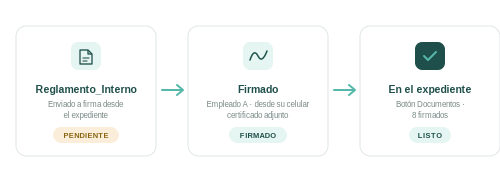
Request signatures directly from employee records — policies, privacy notices, acknowledgments. Documents signed through Sign appear on the employee profile's Documents button.
Request review and signature from the record
Signed documents visible on employee profiles
Printable badges with barcodes or RFID
EMPLOYEES + LEARNING
Visible skills,
certifications that don't expire unnoticed
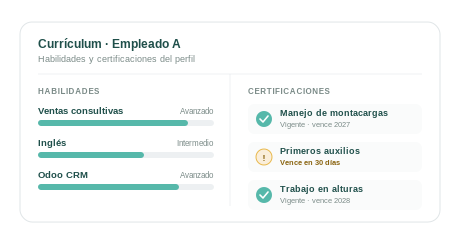
Each employee's résumé records their experience, skills by level and certifications with validity dates. Assigned eLearning courses show their progress from the profile, and you can search the whole staff by experience, education or certification.
Skills by level on the profile résumé
Certifications with expiration dates and status
Assigned courses with visible progress
WHO IT'S FOR
If employee records live in folders, Excel and HR staff's memories, this is for you.
HR teams with paper personnel files
Physical folders, expiring contracts without warnings, and documents that only turn up when inspectors ask for them.
Operations that require certifications
Plants, workshops, and construction companies where expired certifications — forklift, working at heights, first aid — present real risks.
Growing companies
You've grown from 15 to 50 employees, and the Excel directory can't keep up: nobody knows who reports to whom or which equipment is assigned to each person.
Multiple branches and hybrid work
Teams split between branches, office, and home. You need to know who's where each day without asking on WhatsApp.
FREQUENTLY ASKED QUESTIONS
What we get asked most before getting started
01 What information is stored in each employee record?
Employment details (position, department, schedule, work location), personal and HR information, contracts, assigned equipment, documents, and a CV with experience, skills, and certifications. All in one record with history.
02 Can I control who sees each person's information?
Yes. Employees, managers, and team leaders have different access levels to keep private information confidential. You can also choose whether employees may edit their own details.
03 Is the organizational chart created automatically?
Yes. Assign each employee a department and direct manager, and the organizational chart is built automatically and displayed on their profile, including their position in the hierarchy, manager, and direct reports. Departments can have parent departments for larger structures.
04 How do onboarding and offboarding plans work?
Customizable activity plans: when someone joins or leaves, assigned tasks are triggered — training, equipment handover, document signatures, access. Every new hire arrives prepared, and every departure is closed properly.
05 Will it alert me before contracts or permits expire?
Yes. Set how many days in advance to send the alert, and the system notifies the manager about an employee's upcoming contract or work permit expiration.
06 Can employees sign documents digitally?
Yes. From an employee's record, you can ask them to review and sign a document — such as company policies, privacy notices, or acknowledgment forms — through the Sign app. The signed file is saved under the Documents button on their profile.
Employees connected to your entire operation

Attendances
Clock-ins and clock-outs through kiosks, badges, PINs, or RFID. Real-time attendance feeds Employees dashboards.

Time Off
Vacations, leave, and sick days with approval workflows. Each employee's remaining days are visible on their profile.

Payroll
Contracts, schedules and work entries in the employee record feed payroll calculations — with no duplicate data entry.

Recruitment
From hired applicant to registered employee: the personnel record is created during Recruitment without re-entering data.
Tell us how you manage your people today
A Wayakna consultant will review your situation: how many employees you have, how you manage personnel files and which certifications you track, and recommend the right implementation without unnecessary complexity.