1
a candidate card automatically created for each application
0
calls to schedule: candidates choose a time based on your availability
OCR
resumes are digitized on arrival and shown on the candidate card
1CLICK
from hired candidate to employee record, without reentering data
Recruitment in action
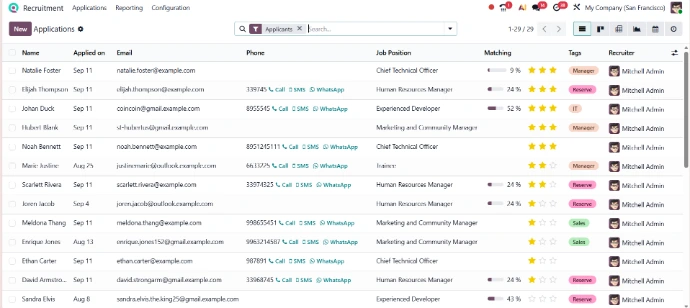
POSITIONS
Your job openings on one dashboard
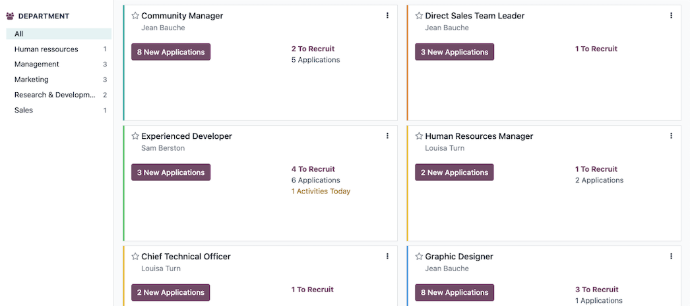
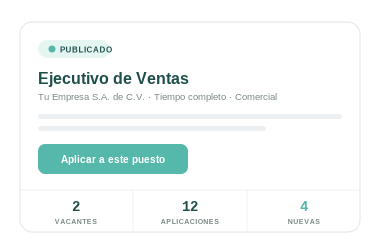
Every position has a card showing vacancies, applications, and activities — plus a Published banner once it starts receiving candidates.
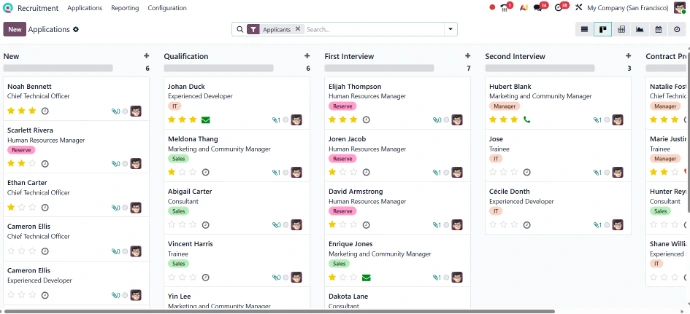
PIPELINE
Candidates organized by stage in Kanban
Each candidate is a card that moves from stage to stage (by dragging or using its form), with their CV visible right on the card.
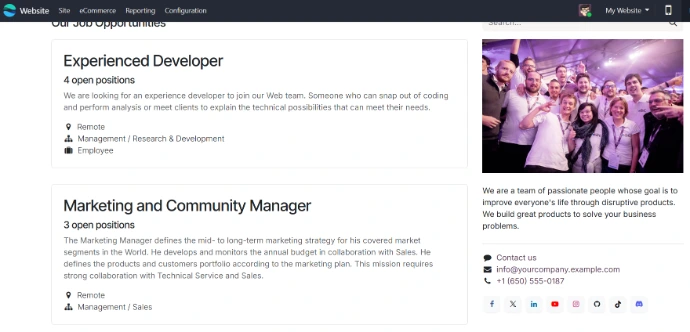
JOB POSTING ONLINE
Vacancies published on your website
Job openings are published on your careers page; candidates apply there and their cards appear in the pipeline without manual entry.
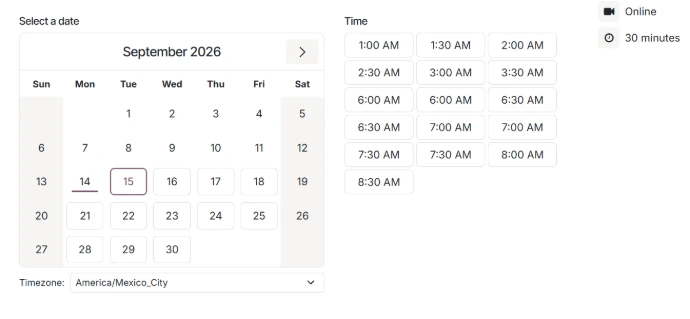
INTERVIEWS
Candidates schedule their own interviews
Candidates schedule calls and interviews from your website, viewing only the recruiter's available slots.
Connected Recruitment, not isolated
Odoo Recruitment isn't an email inbox full of attached CVs. It's a pipeline with automated stages for each candidate, where the end of the process isn't a signed PDF in a folder — it's an employee registered in the system.
Kanban pipeline with customizable stages by process
Automatic template emails when entering each stage
Each job position has an email address: incoming messages become applicants
CV scanned with OCR and visible on the card
Interview questionnaires and assessments by position
Hired applicant → employee in the system with one click
Everything your hiring process needs, already included...
Positions with their own vacancies
Every position has a card showing open vacancies, applications received, and pending activities — published on your website when you decide.
Customizable pipeline
Kanban stages adapted to your process — shared across positions or specific to each. Move candidates by dragging.
Automatic emails by stage
When a candidate enters a stage, your chosen email template is sent automatically — confirmations, next steps, or thank-you notes.
CVs that arrive automatically
Every position has an application email address: messages sent there turn into applicants, with CVs digitized by OCR and visible on the card.
Automatically scheduled interviews
Candidates schedule calls or interviews from the website, seeing only the recruiter's actual availability — no back-and-forth emails.
Offer with remote signature
Generate offers; candidates review them, enter personal details, and sign online. Expiration dates prevent open-ended offers.
RECRUITMENT + WEBSITE
The published job posting,
the candidate in your pipeline
Candidate card created automatically for every application
Dedicated application email address per position
The offer that gets signed
without anyone printing a thing
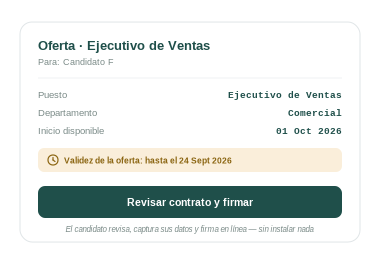
Create time-limited offers for candidates. They receive them by email, review online, enter personal details, and remotely sign contracts — no software installation or back-and-forth scanned PDFs.
Job offer generated and emailed from the system
Candidates review, enter their details, and sign online
Validity date: documents cannot be signed after it
RECRUITMENT + EMPLOYEES
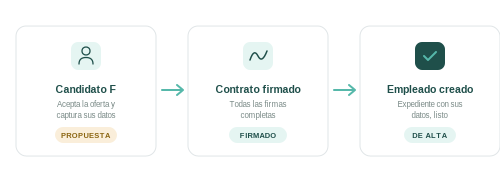
Signed contract
employee record created
When the contract is fully signed, an employee record is created in the system using information the candidate entered when accepting the offer. The process doesn't end with a PDF in a folder: it ends with a ready-to-use employee record
Employee record created once all contract signatures are complete
Data entered by the candidate flows into their employee record
Hired → employee in one click, without re-entering data
WHO IT'S FOR
If job openings live in email and candidates in the recruiter's memory, this is for you.
High-turnover operations
Restaurants, retailers, plants, and warehouses hiring all year — needing hiring workflows that keep working even when recruiters change.
One-person HR teams
When one person has to post, screen, schedule, and hire, automated stages and self-scheduling give them hours back every week.
Multiple branches
Simultaneous job openings across multiple locations — each with its own pipeline and recruiter, all visible on one dashboard.
Businesses losing candidates
If interviews and offers take two weeks of emails and PDFs, the best candidate has already signed elsewhere. Online offers close in days.
FREQUENTLY ASKED QUESTIONS
What we get asked most before getting started
01 How do candidates enter the system?
Two paths: apply through vacancies posted on your website or email CVs to the job's address. Either way, applicant cards are created automatically in Recruitment — no manual entry.
02 Can I adapt the stages to my process?
Yes. Odoo's default workflow is a starting point: add, remove, or rename stages to match your actual process. Stages apply to every job opening unless you designate them as position-specific.
03 What can be automated at each stage?
Each stage can have an email template sent automatically when candidates enter it — application confirmation, interview invitation, next steps. You decide which stages send messages and what they say.
04 How do interviews and tests work?
Create job-specific questionnaires or tests for candidates — Odoo calls them "interviews" and they give your team context before calls. Candidates can also book interviews from the website using the recruiter's real availability.
05 How is the offer generated and signed?
From the candidate's record, generate an offer with an expiration date. They receive it by email, review it online, enter personal information, and sign remotely without installing anything. Expired offers can't be signed. Signing requires the Sign module.
06 What happens when a candidate accepts?
When all contract signatures are complete, an employee record is created with the information the candidate entered when accepting. The hire becomes an employee without re-entering data, and the record is ready in Employees.
Recruitment connected to your entire operation

Employees
Once the contract is signed, an employee record is created using the information the candidate entered — their personnel file is complete from day one.

Sign
Candidates sign contracts online from any device — with completion certificates and no software installation.

Website
Your careers page displays open positions — candidates apply there and enter the pipeline directly, with no manual data entry.

Referrals
Your employees share vacancies and refer candidates — earning points and rewards as each referral progresses.
Tell us how you hire today
A Wayakna consultant will review your recruitment process — how many vacancies you open each year, where candidates come from and how long hiring takes and recommend the right implementation without unnecessary complexity.