1
a dashboard for each employee showing their actual balance: allocated, accrued, and available
0
"Who's in tomorrow?" messages: the team calendar has the answer
2
possible approval levels for each leave type — or none
∞
leave types configurable to match your policy and local law
Time Off in action
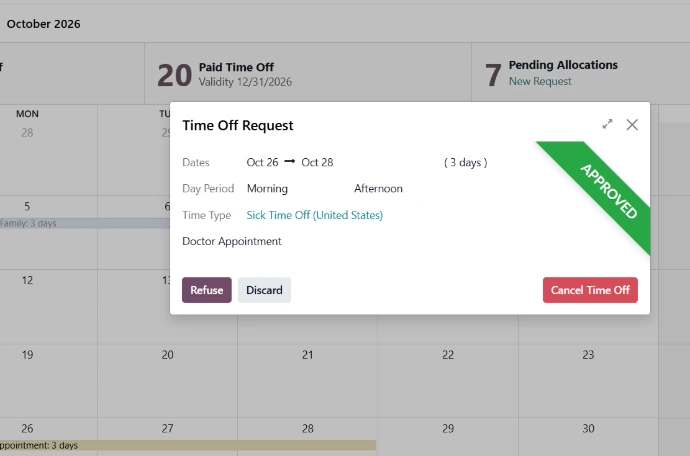
APPROVALS
Everything pending on one dashboard
Managers review leave and allocation requests from their own dashboard — approving or rejecting with full context.
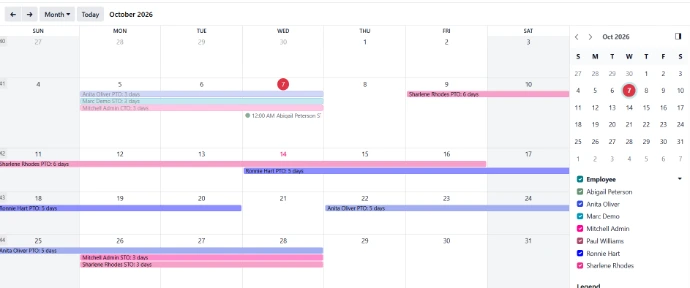
TEAM
Who's away, at a glance
The calendar color-codes everyone: solid for approved leave, striped for pending second approval.
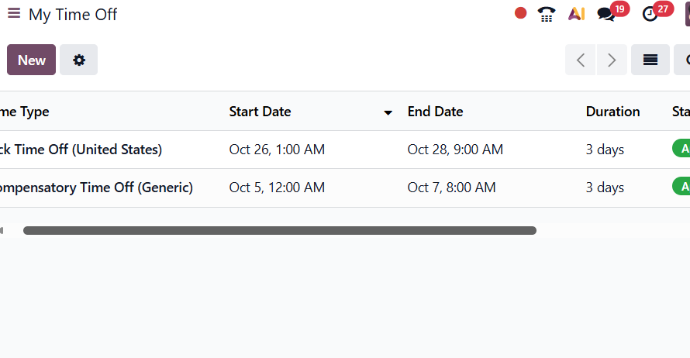
MY TIME
The actual balance, without asking HR
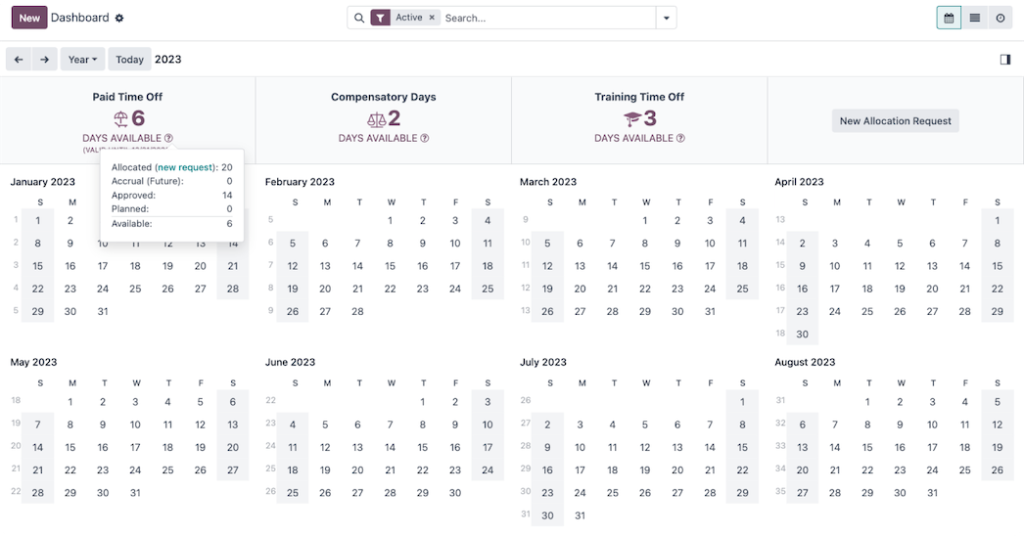
Every employee sees time-off days by type: allocated, accruing, approved, and still available.
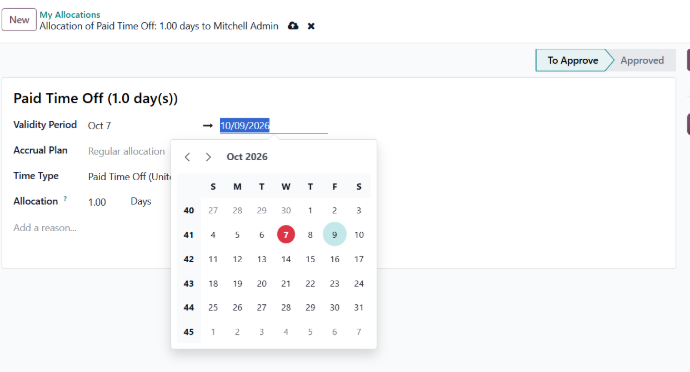
REQUEST
Requesting leave takes a minute
Employees choose leave types and dates on their dashboard and submit. Requests follow the approval process you've defined for each type.
Connected time off, not isolated
Odoo Time Off isn't a vacation form HR has to enter into Excel. Each request deducts the correct balance, reaches the right approver, and appears on the team calendar — with accrued days automatically calculated according to your plan.
Requests with one- or two-level approval — or automatic approval
Absence types configurable to match your policy
Clear balances: allocated, accrued, approved and available
Official public holidays under local law
Team calendar: who's away and when
Everything your leave management needs, already included...
Paperless requests
Employees submit requests from their dashboard. Each type has its approval setting: automatic, by the time-off manager, or two-level approval.
Types tailored to you
Vacations, sick leave, paid or unpaid time off, working from home — each type with its own rules, tracked in days or hours, with or without prior allocation.
Transparent balances
Allocated, future accrual, approved, planned, and available — the complete breakdown, plus the projected balance on a future date.
Accrual plans
Days earned through time worked, with milestone caps and year-end carryover rules — even resetting to zero if your policy requires it.
Flexible assignments
Allocate days to one person, a team, or the whole company — as a regular allocation with a validity period or earned through an accrual plan.
Team calendar
Each person has a color: solid for approved absences, striped for pending second approval. Official holidays are already loaded.
The request arrives
to the right approver
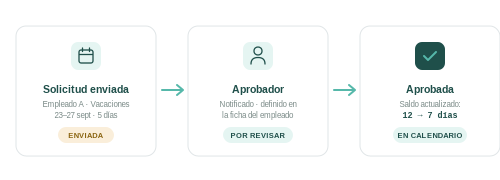
Each employee's time-off approver is set on their profile — requests reach the right person, not a generic inbox. Remaining days are visible right on the employee's record, with links to their requests.
Employee-specific time-off approver
The automatically calculated balance,
today and in the future
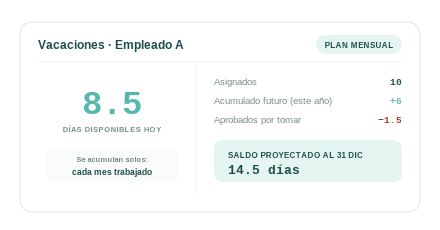
With an accrual plan, time-off days are earned as people work — and employees can see not only today's balance, but their projected days on a future date, including accrual and approved requests. No more manual calculations.
Accrual based on time worked, with caps at each milestone
Breakdown: allocated, future accrual, approved, and available
Forecast the balance for any future date
Who's out,
without asking in chat
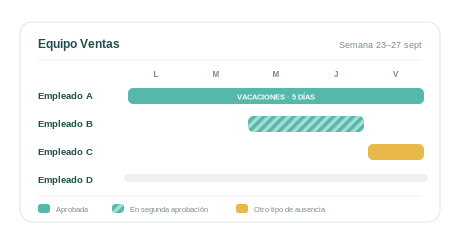
The team calendar shows everyone’s absences, each person in a different color. Approved leave appears solid; requests awaiting second approval appear striped. Planning the week — or covering a shift — no longer requires an endless message thread.
Team view showing everyone's absences
Solid = approved · striped = undergoing second approval
Official public holidays visible to everyone
WHO IT'S FOR
If your time off is tracked in an Excel file only HR understands, this is for you.
Balances in Excel, leave requests by email, and endless arguments over "I had more days" — replaced by automatically calculated balances.
Each department has an approver and its own rules; HR gets the full view and reports by employee, absence type, or balance.
FREQUENTLY ASKED QUESTIONS
What we get asked most before getting started
From their dashboard, employees see balances by absence type, choose dates, and submit requests. Each follows its configured approval flow — no validation (automatic approval), approval by the time-off manager, or two levels.
03 What leave balance information can employees see?
The complete breakdown: allocated days, future accrual, approved upcoming time off, planned days, and available balance. With an accrual plan, employees can also choose a future date and see projected balances, including approved leave.
How do accrual plans work?
For every period worked, employees earn a defined amount of time off based on your rate. Plans support milestone caps and period-end carryover rules, including resetting accruals to zero if required by policy.
05 How do I allocate leave days to my employees?
With allocations: regular — a fixed amount valid for a set period — or accrual-based, linked to a plan. Grant them to one person, a team, or the entire company at once.Can the team see who is away?
Yes. The team calendar shows each person in a different color: approved time off appears solid, while requests awaiting a second approval appear striped. You can also configure public holidays so everyone receives the legally required days off.
Time Off connected to your entire operation

Employees

Attendances
Clock-ins, clock-outs, and absences in the same ecosystem — a complete view of your team's attendance.

Payroll
Approved absences are recorded for Payroll — vacation, sick leave, and other time off, fully documented.

Appraisals
The other side of employee wellbeing: regular appraisals with feedback, goals, and skills development.