0
No spreadsheets
Check stock levels and locations in Odoo, without relying on spreadsheets or separate files.
Min/Max
Automatic replenishment
Define minimum and maximum levels to trigger purchases or transfers when stock falls below the threshold.
FEFO
Stock removal by expiration date
Prioritize products nearing expiration and automatically organize stock movements using the FEFO strategy.
100%
Lot or serial number traceability
Trace the complete history of each lot or serial number, from receipt and storage location through final customer delivery.
Inventory in action
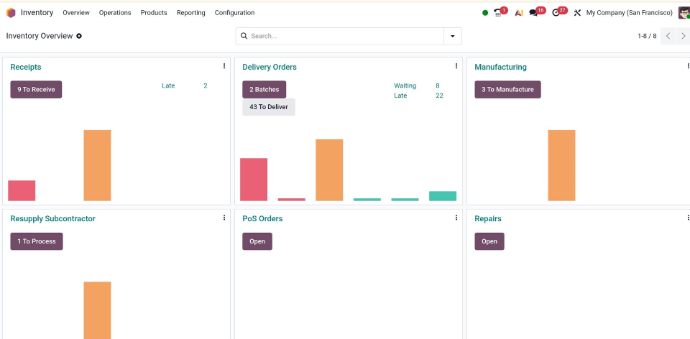
OPERATIONS
Receipts and deliveries on one dashboard
See pending receipts, deliveries, and transfers, along with their status and operational progress.
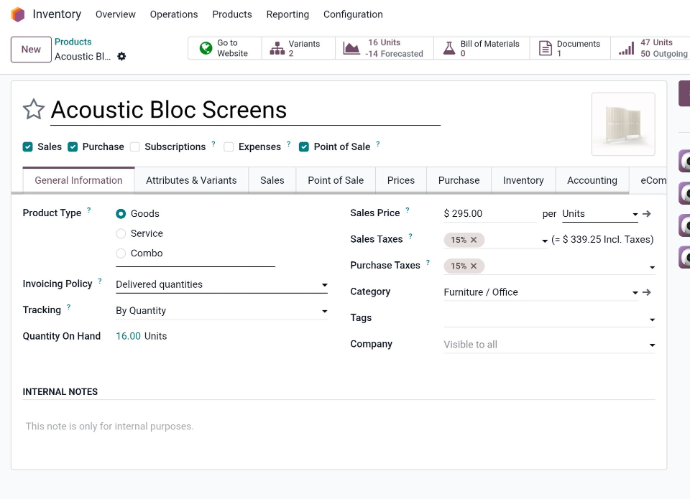
STOCK
Stock by warehouse and location
Check available, reserved, and incoming stock in every warehouse and location.
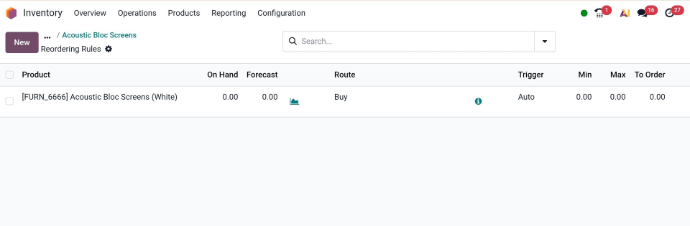
REPLENISHMENT
Automatic inventory replenishment
Set minimum and maximum stock levels to trigger purchases or transfers when inventory drops below the threshold.
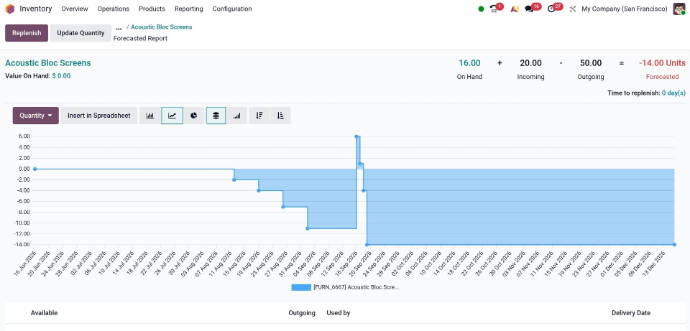
TRACEABILITY
Lot and serial number traceability
Trace the origin, movements, locations, and destination of every recorded lot or serial number.
Connected Inventory, not isolated
Odoo Inventory updates stock and movements in real time. Every receipt, delivery or transfer is recorded with its source and destination, connecting inventory, purchasing and sales in one seamless operation.
Real-time stock by warehouse and location
Receipts, deliveries and transfers in one workflow
Lot and serial number traceability
Expiration, best-before, removal and alert dates
Removal strategies: FIFO, LIFO and FEFO
Inventory valuation using FIFO, average cost or standard price
Everything you need to manage your inventory
1
Multiple warehouses and locations
Manage multiple warehouses and check stock by location from one system.
2
Automatic replenishment
Set minimum and maximum levels to generate purchases or transfers when stock falls below the threshold.
3
Full traceability
Track lots and serial numbers from receiving to delivery.
4
Expiration dates under control
Manage expiration dates, best-before dates and FEFO stock removal to reduce losses.
5
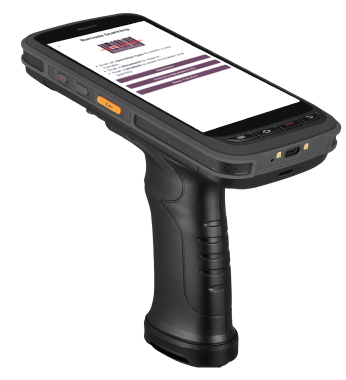
Barcode
Receive, deliver, transfer and count inventory by scanning, with no manual data entry.
6
Inventory valuation
Check inventory valuation using FIFO, average cost or standard price according to your operations.
INVENTORY + PURCHASE
Inventory that replenishes itself
before you run out
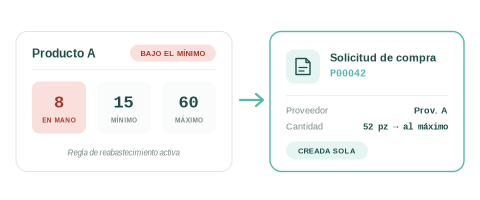
Every product has its own rule: minimum and maximum stock. When inventory falls below the minimum, a purchase request to the supplier is generated automatically — or a transfer from your central warehouse if the goods are already available elsewhere.
Reordering rules with minimum and maximum levels by product
Purchase request generated automatically when stock drops below the threshold
Or an automatic transfer from another warehouse
INVENTORY + SALES
Sell what you actually have,
reserves what you sold
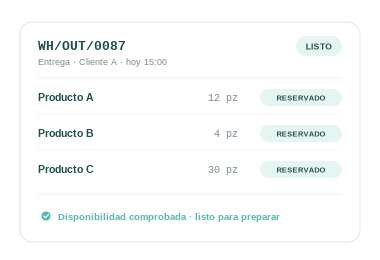
Confirming a sale creates a delivery order. Check availability with one click and reserve quantities — Sales can see what can actually be promised, and the warehouse knows exactly what to prepare.
Stock availability shown before confirmation
Automatic reservation of sold products
Delivery order generated from the sale
INVENTORY + BARCODE
A warehouse you can operate
by scanning, not typing
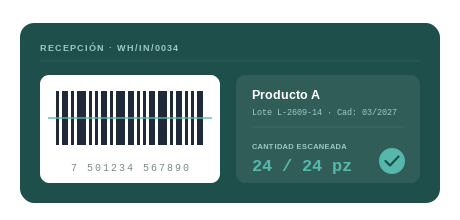
Barcode validates every operation by scanning: receive, deliver, and count using a scanner. Lots and serial numbers are recorded instantly — without switching to a computer or typing manually.
Receipts, deliveries and transfers with a scanner
Lots and serial numbers recorded when scanning
Inventory counts and adjustments within the same workflow
WHO IT'S FOR
If your inventory lives in an Excel file nobody trusts, this is for you.
Distributors and wholesalers
Manage large SKU volumes, inventory, reservations, and Replenishment across warehouses.
Multi-branch retail
Control inventory by store and automatically transfer goods from a central warehouse when stock runs low.
Food and perishables
Manage lots, expiration dates, and FEFO strategies to ship items that expire first.
Equipment with serial numbers
Track every unit from receipt to delivery, with history for warranty and service.
FREQUENTLY ASKED QUESTIONS
What we get asked most before getting started
01 What is Odoo Inventory?
Odoo Inventory lets you manage stock, warehouses, movements, replenishment, traceability and warehouse operations in one system.
02 What is the difference between FIFO, LIFO and FEFO?
FIFO prioritizes oldest inventory, LIFO the most recent, and FEFO items with the earliest expiration dates.
03 Can Odoo manage multiple warehouses and branches?
Yes. Manage multiple warehouses and internal locations, transfer stock between them, and set up automatic replenishment rules between branches.
04 How does automatic replenishment work in Odoo?
Set minimum and maximum stock by product. When inventory falls below the threshold, Odoo can create purchases or transfers from another warehouse.
05 How does lot and serial number traceability work in Odoo?
Odoo tracks lots and serial numbers from receipt to delivery, including movements, locations, dates, and destinations.
06 How do I manage expiration dates and FEFO in Odoo?
Record expiration dates and configure FEFO to ship products with the earliest expiration first.
07 How is inventory valued in Odoo?
Odoo supports stock valuation methods such as FIFO, average cost, and standard price, depending on your inventory accounting setup.
08 How do I use barcodes in Odoo Inventory?
With the Barcode app, record receipts, deliveries, transfers, and stock counts using a compatible scanner or device.
Inventory connected to your entire operation

Sales
Reserve stock when confirming sales and generate delivery orders using updated Inventory.

Purchase
Replenishment rules can generate purchase requests and update stock when goods are received.

Manufacturing
Manufacturing orders consume components and record finished products directly in Inventory.

Barcode
Record receipts, deliveries, transfers, and counts by scanning, reducing manual data entry.
View module →
Tell us how you manage inventory today
A Wayakna consultant will review your operations — how many SKUs and warehouses you manage and whether you track lots or serial numbers — and recommend the right implementation without unnecessary complexity.