Three pain points this sector knows all too well
01 Orders get lost between dining room and kitchen
Servers take notes, walk to the kitchen and relay instructions — and the wrong dish still comes out.
HOW ODOO SOLVES IT
Orders are entered at tables on the floor plan and sent straight to the kitchen — no paper slips or broken telephone.
02 "Could you split the bill?"
Six friends, three cards, two cash payments — and the checkout becomes a math exam.
HERE'S HOW ODOO SOLVES IT
Split the bill in Point of Sale and let everyone pay their share using their preferred payment method.
03 Cash reconciliation never balances by itself
Between tips, complimentary items and shift changes, counting cash at closing feels like a lottery.
HERE'S HOW ODOO SOLVES IT
The session starts with its opening balance, records cash in and out, and closes by comparing expected cash with the counted amount.
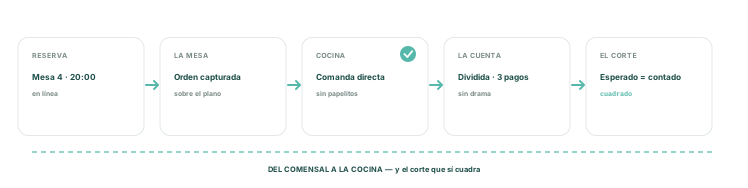
From reservation to paid check
complete service without paperwork
The apps this industry uses every day


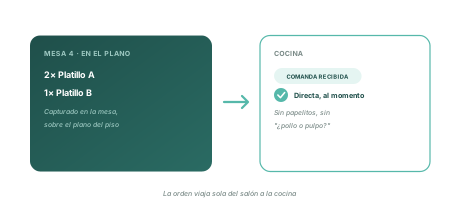
KITCHEN ORDER
Table 4 ordered
the kitchen already knows
Servers enter orders on the floor plan: table 4's order goes straight to the kitchen — no scraps of paper, messy handwriting, or wondering whether it said chicken or octopus.
Order taken at the table
Straight to the kitchen, instantly
The floor plan as a dashboard
CHECK
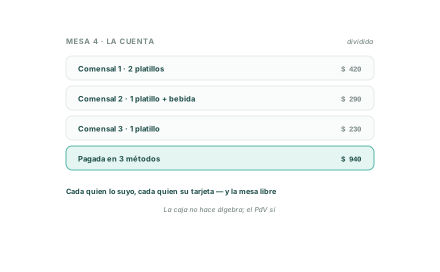
Six friends,
no hassle
Split table bills directly in Point of Sale: each guest pays for their own items with their own method — and the table clears without cashier arithmetic.
Split the bill in Point of Sale
Everyone pays using their preferred method
Free up tables without hassle
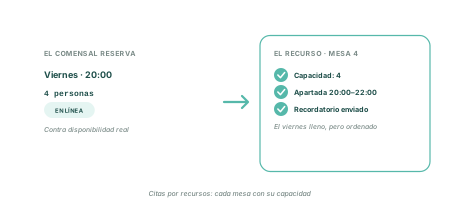
BOOKING
The table is reserved
against actual capacity
Online reservations use resource-based Appointments: each table has capacity, visible available slots, and automatic reminders — a packed Friday, but organized.
Online booking by resource
Actual capacity per table
Automatic reminders
WHO IT'S FOR
If your operation runs between the dining room and kitchen, this is for you.
Full-service restaurants
Table layout, kitchen orders, and bills without the drama
Coffee shops and coffee bars
Fast checkout with cash reconciliations that actually match.
Hotels with food service
A restaurant connected to the rest of your operation.
Catering and events
Reservations, supplies, and Invoicing in one system.
FREQUENTLY ASKED QUESTIONS
What the industry asks us before getting started
01 Can servers take orders at the table?
Yes. On the PoS Restaurant floor plan: take the order at the table and send it directly to the kitchen.
02 Can I import my existing contact database?
Yes. The table's bill can be split in Point of Sale, and each diner pays their share using their preferred method.
03 How do I manage reservations?
With resource-based Appointments: each table has its capacity, online availability, and automatic guest reminders.
04 Does the cash closing balance?
Sessions open with starting cash, log cash in and out with reasons, and close by comparing expected and counted amounts.
05 Does this require a huge implementation?
No, in stages: PoS Restaurant first, then ingredients, Purchase, and reservations. Let's discuss your case.